

Contents
On this page
Membership plans - Plugixa Video
A membership plan is a recurring price, billed monthly or yearly, that unlocks paid videos for as long as the member keeps paying. Plans are offered on the locked player of every paid video they cover, beside the video’s own Buy and Rent offers (see Selling videos).
Plans are part of the Payments app. Open Membership plans in the admin app’s menu. The screen is for users who manage the plugin’s settings.
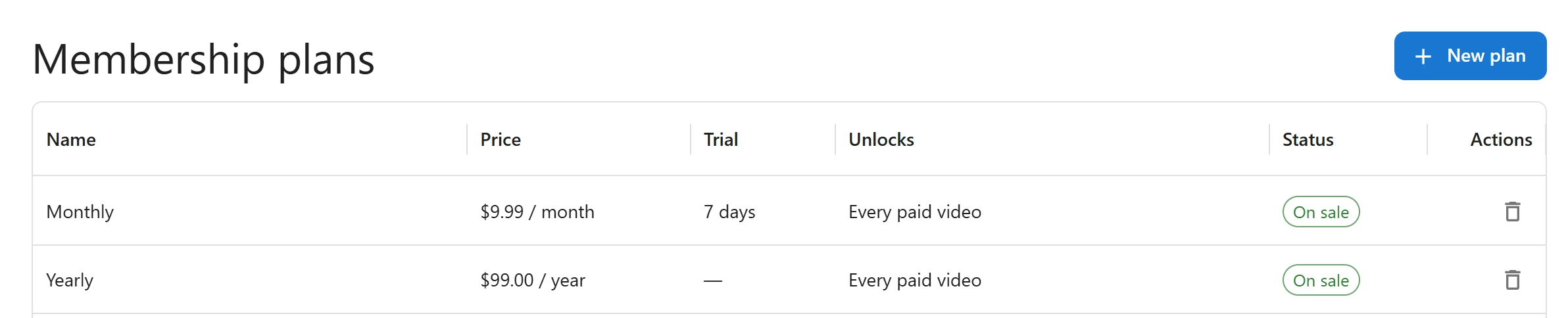
The plans list
| Column | What it shows |
|---|---|
| Name | The plan’s name, as viewers see it on the offer button. |
| Price | The price and its period, for example “$9.99 / month”. |
| Trial | The free trial, for example “7 days”, or a dash when there is none. |
| Unlocks | Every paid video, or the number of channels, for example “2 channels”. |
| Status | On sale or Archived. |
| Actions | A delete button. |
Click a row to edit the plan. Click New plan to add one. With no plan yet, the list reads “No membership plans yet.”
Plan fields
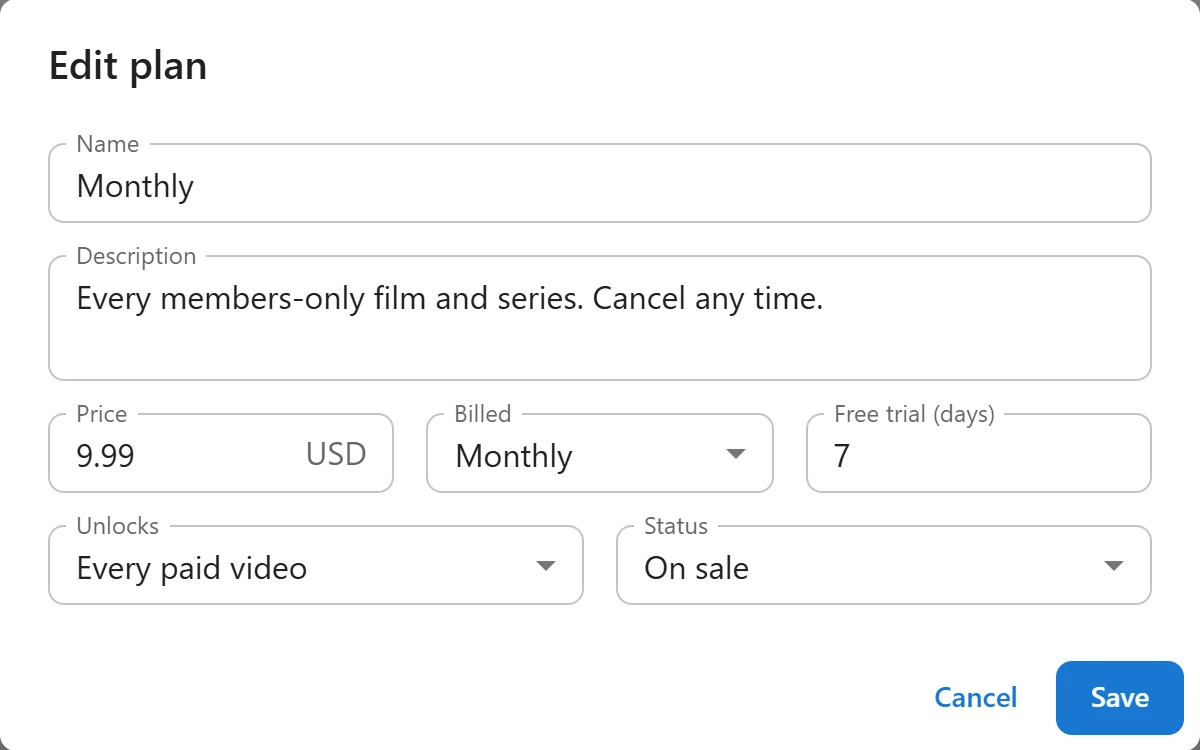
| Field | Notes |
|---|---|
| Name | Required: “Give the plan a name.” Shown on the offer button and on the payment page. |
| Description | Optional. Sent to Stripe as the description of the line the buyer pays for. |
| Price | Required and more than zero: “The price must be more than zero.” In the site currency, shown beside the field. |
| Billed | Monthly or Yearly. |
| Free trial (days) | 0 for none, up to 730. During the trial the member has access and pays nothing. |
| Unlocks | Every paid video, or Paid videos of chosen channels. The second choice only appears while the Channels app is on. |
| Channels | Shown for Paid videos of chosen channels. Pick one or more: “Choose at least one channel.” |
| Status | On sale or Archived. Archived reads: “No new sign-ups; current members keep access.” |
Click Save to store the plan.
Neither Stripe nor PayPal needs a product set up in advance: the plan’s price is sent with each checkout. With PayPal, a billing plan is created in your PayPal account the first time someone subscribes, and a new one each time you change the plan’s price, currency, period, trial or name. Members who already subscribed keep paying the price they signed up for.
PayPal accepts a trial of at most 365 days. A longer trial is shortened to 365 days for PayPal subscribers.
What a plan unlocks
A plan unlocks videos whose Access is Paid, and nothing else:
- Every paid video: every paid video on the site, including those in no channel.
- Paid videos of chosen channels: the paid videos whose channel is in the list. A paid video in no channel is not covered.
A plan is offered on a paid video only when it covers that video and is On sale. Videos set to Members are for any signed-in member and do not need a plan. See Access control.
On the offer button, the line under the price reads “7-day free trial” (with the plan’s number of days) when there is a trial, and “Unlocks every video in the plan” otherwise.
Renewal
Each period is charged by Stripe or PayPal on its own, and the site extends the member’s access when the renewal is reported. Access runs to the end of the paid period, plus 2 days of grace.
When a renewal cannot be charged:
- Stripe keeps retrying on its own schedule. Access stays open until the next attempt, plus 2 days.
- PayPal subscriptions are created to stop after one failed payment, so PayPal does not retry. Access ends 2 days after the paid period.
Either way the member gets one email per failed attempt, “Your membership payment did not go through”, with the next attempt date when there is one and, for Stripe, a link to pay. This email is sent even when receipts are switched off. A member whose subscription is finally ended by the provider loses access at once.
Cancellation
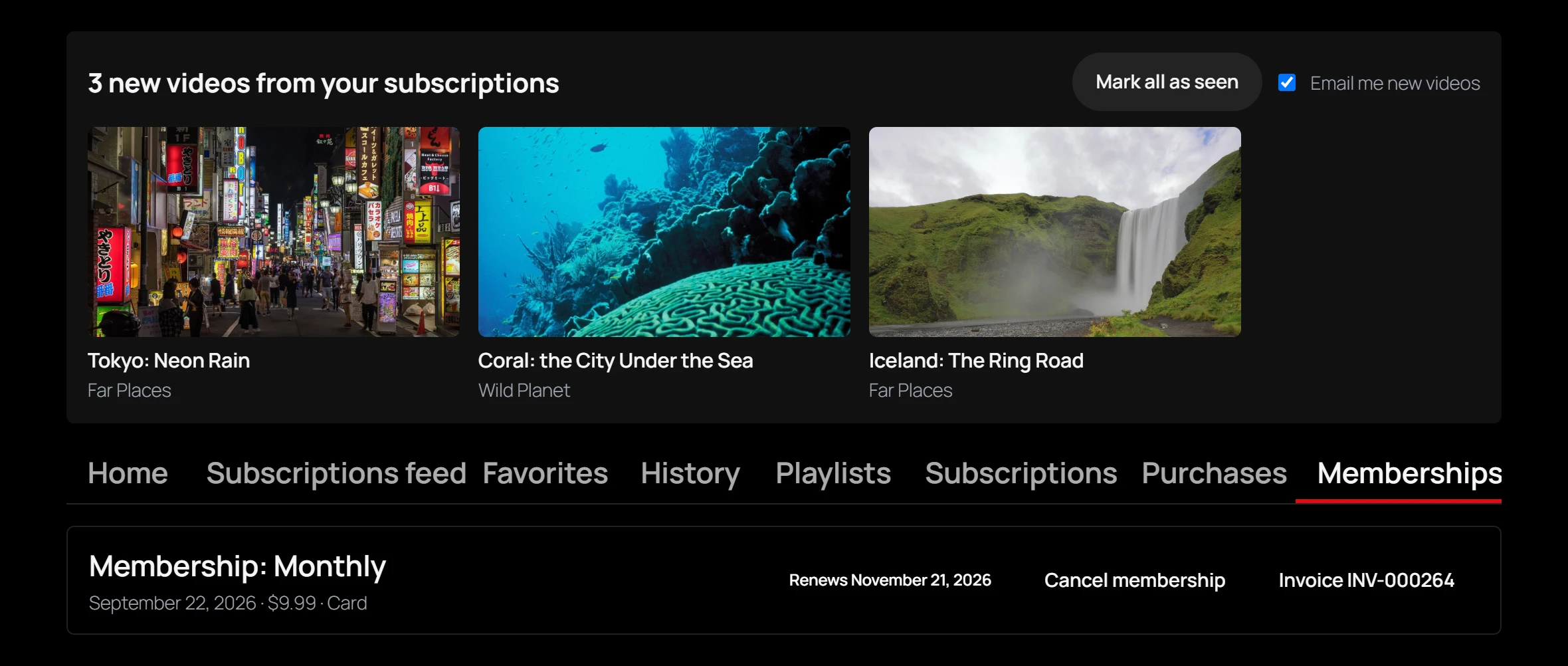
By the member. In the member library, the Memberships tab lists each membership with its badge (Renews and a date, Ends and a date, Ended or Refunded) and its invoices. An active one has a Cancel membership button. After confirming, the member reads “Your membership is cancelled. You keep access until the end of the period you paid for.” It does not renew again.
With Stripe the subscription is set to end with the period. PayPal cannot schedule an end, so the PayPal subscription is cancelled at once; access still lasts to the end of the paid period.
By you. On the Orders page, a paid membership has a Cancel button: “Cancel this membership now? The member loses access and is not charged again.” This ends access at once, even for a membership the member had already cancelled to the end of its period. Refund last refunds the latest payment and ends the membership too.
Delete or archive a plan
The delete button asks: “Delete this plan? A plan someone has bought is archived instead, so its members keep their access.”
- A plan with no orders is deleted.
- A plan with at least one order is set to Archived. It is no longer offered, and members who hold it keep their access.
To stop selling a plan without deleting it, set its Status to Archived.
Related
Quick Links
Share