

Contents
On this page
Invoices and earnings - Plugixa Video
Every payment the site receives is written to a sales ledger: first payments, membership renewals, refunds and chargebacks. The ledger feeds three things: the buyer’s receipt and invoice, the Earnings page, and the revenue figures on Analytics.
All of this is part of the Payments app.
Receipts
After every payment, including each membership renewal, the buyer gets an email:
- Subject: “[Your site name] Your receipt INV-000265”
- Body: a thank-you line, the Item, the Amount, the Invoice number and a link under “View or print your invoice:”.
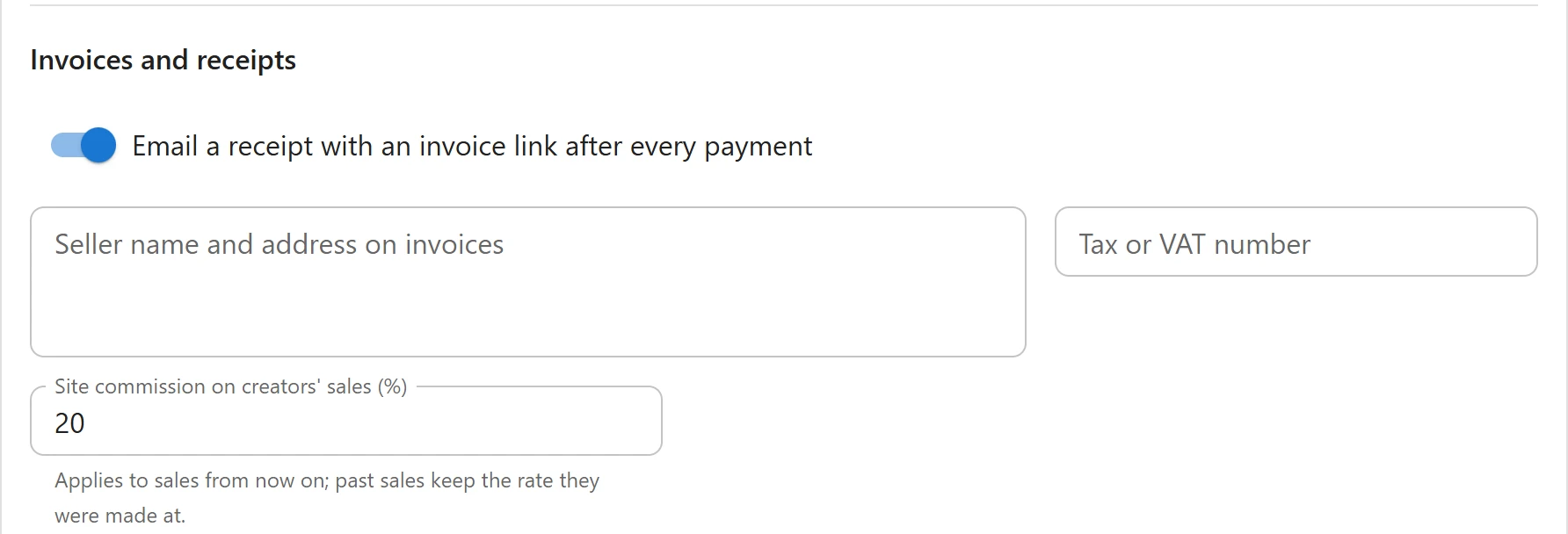
Receipts are on by default. Turn them off under Settings -> Payments, in Invoices and receipts: Email a receipt with an invoice link after every payment. The email about a failed membership renewal is sent either way.
Developers can change the email with the plugixa_video_receipt_email filter, see
Hooks.
Invoices
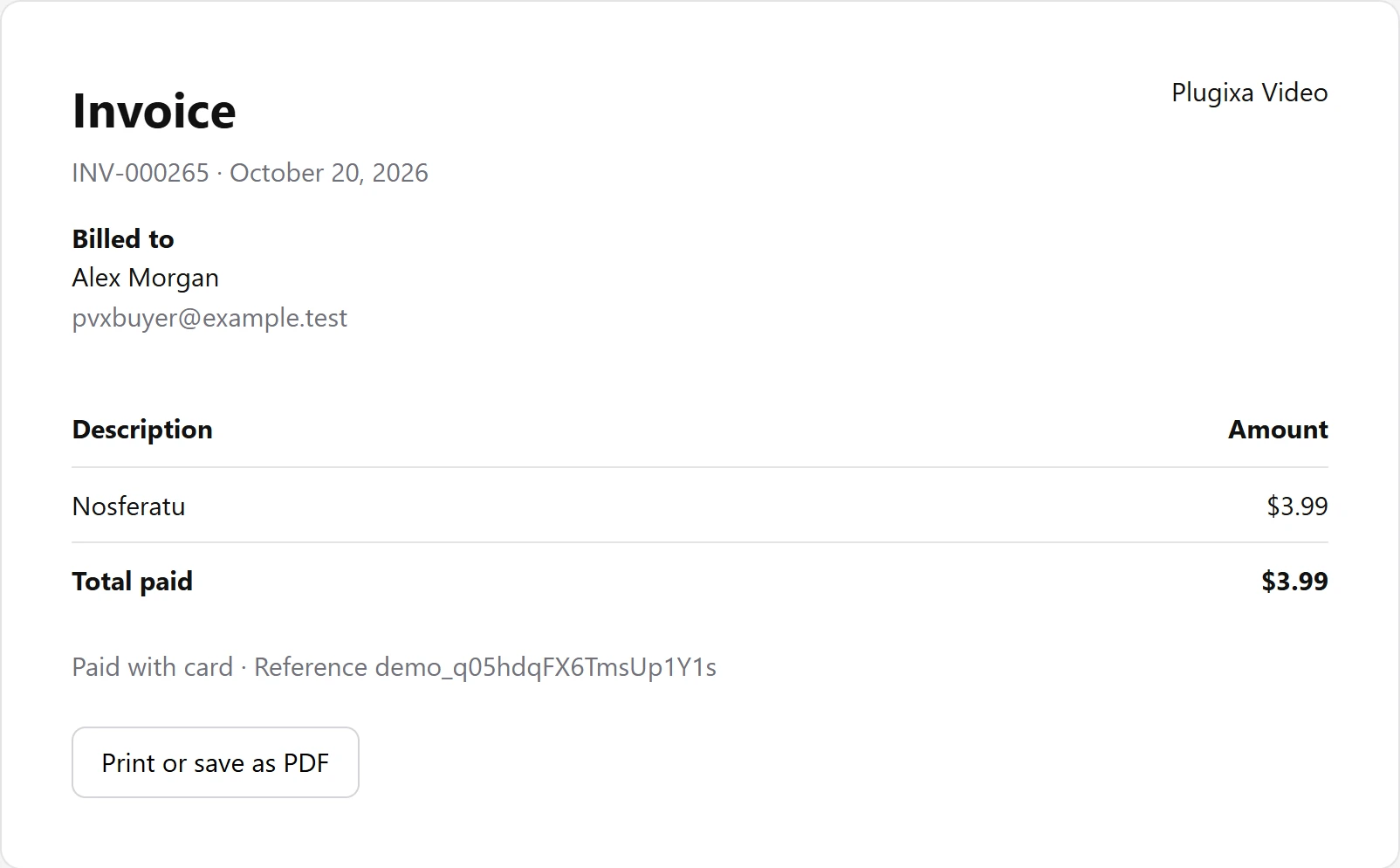
Each payment gets its own invoice page on your site. It shows:
- Invoice, the invoice number and the payment date.
- The seller block, and “Tax ID:” with your tax number when you set one.
- Billed to: the buyer’s name and email address.
- A Description and Amount table with the item and Total paid.
- “Paid with card” or “Paid with PayPal”, and the provider’s reference for the payment.
- A line for each later refund of that payment: “Refunded $3.99 on” and the date.
- A Print or save as PDF button, which opens the browser’s print dialog.
Buyers reach their invoices from the receipt email and from the Purchases and Memberships
tabs of the member library, which list them as
“Invoice INV-000265”. The address looks like https://example.com/?pvx_invoice=265. Only the
buyer and users who manage the plugin’s settings can open it. A visitor who is not signed in is
sent to sign in first; anyone else gets “Not found.”
Numbering
Invoice numbers are sequential across the whole site, with no gaps and no duplicates: the first payment is INV-000001, the next INV-000002, and so on. Only payments get a number; refunds do not.
There is no setting for the format. The prefix is INV- and the number is padded to six digits.
A developer can change the prefix with the plugixa_video_invoice_prefix filter.
Seller details
Set what is printed on every invoice under Settings -> Payments, in Invoices and receipts:
| Field | Notes |
|---|---|
| Seller name and address on invoices | Several lines: company name, street, city, country, one per line. Left empty, the site name is printed. |
| Tax or VAT number | Printed as “Tax ID:” under the seller block. Left empty, the line is not printed. |
To have Stripe calculate and collect tax at checkout, see Stripe.
The Earnings page
Open Earnings in the admin app’s menu. It sums the ledger for a period: This month, Last month, This year or Custom with a From and To date. Days follow your site’s time zone, and both dates are included.
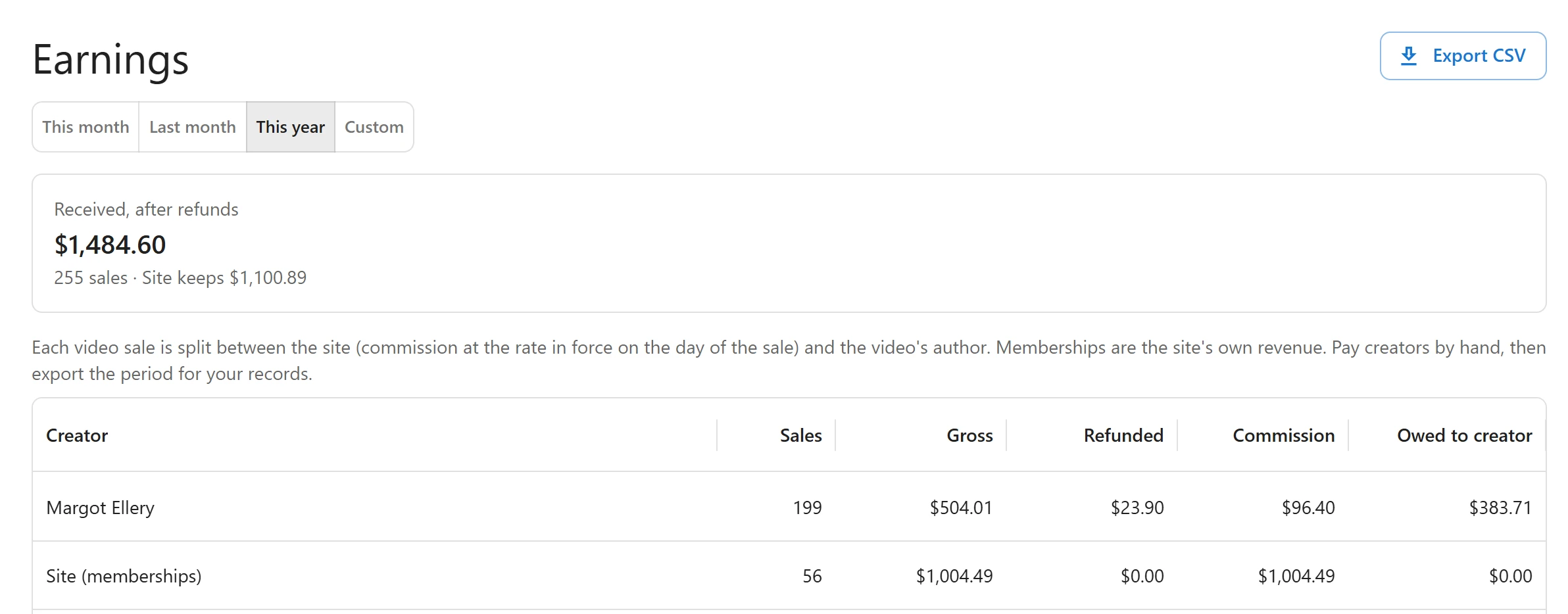
At the top, a card per currency shows Received, after refunds (payments minus refunds), the number of sales and, with creator revenue sharing, what the Site keeps.
Creator revenue sharing
With revenue sharing, the table lists one row per creator and currency:
| Column | What it shows |
|---|---|
| Creator | The author of the videos sold. Memberships are on a Site (memberships) row. |
| Sales | Number of payments. |
| Gross | Money received. |
| Refunded | Money given back (refunds and chargebacks). |
| Commission | The site’s share. |
| Owed to creator | The creator’s share, after refunds. |
How the split works:
- A video sale belongs to the video’s author. A membership unlocks many creators’ videos, so it is the site’s own revenue.
- The site keeps Site commission on creators’ sales (%) of each video sale, set under Settings -> Payments. It is 20 on a new site and can be 0 to 100. “Applies to sales from now on; past sales keep the rate they were made at.”
- A refund takes back the same split as the payment it refunds.
- The plugin does not pay creators. “Pay creators by hand, then export the period for your records.”
Revenue sharing needs the Pro licence for unlimited sites. The plugin checks the licence plan, and only on that plan does it split sales and show the commission field. On other licences the page reads “Splitting sales with creators, with a commission for the site, comes with the Unlimited plan. Every sale here is the site’s own revenue.” and every sale counts as the site’s own revenue. A split is stored when the money moves, so changing licence later does not rewrite past sales.
Export CSV
Click Export CSV to download every movement of the chosen period, oldest first, as
sales-<from>-to-<to>.csv. The file opens in Excel with accents and non-Latin names intact.
| Column | Content |
|---|---|
date |
Date and time, in the site’s time zone |
type |
charge, refund or chargeback |
invoice |
The invoice number (payments only) |
order |
The order number |
item |
The video or plan |
buyer |
The buyer’s email address |
creator |
The creator’s name, empty for the site’s own revenue |
gateway |
stripe or paypal |
reference |
The provider’s id for the movement |
currency, amount, commission, creator_net |
Refunds and chargebacks are negative |
The Earnings page and the export are for users who manage the plugin’s settings.
Related
Quick Links
Share