

Contents
On this page
Coupons and free trials - Plugixa Stream
A coupon is a promo code that viewers type in the wallet before paying. It takes a percentage or an amount off a coin pack, a VIP plan, or both. The free trial is separate: the first VIP plan an account takes can start with free days, with no code at all.
The Coupons page
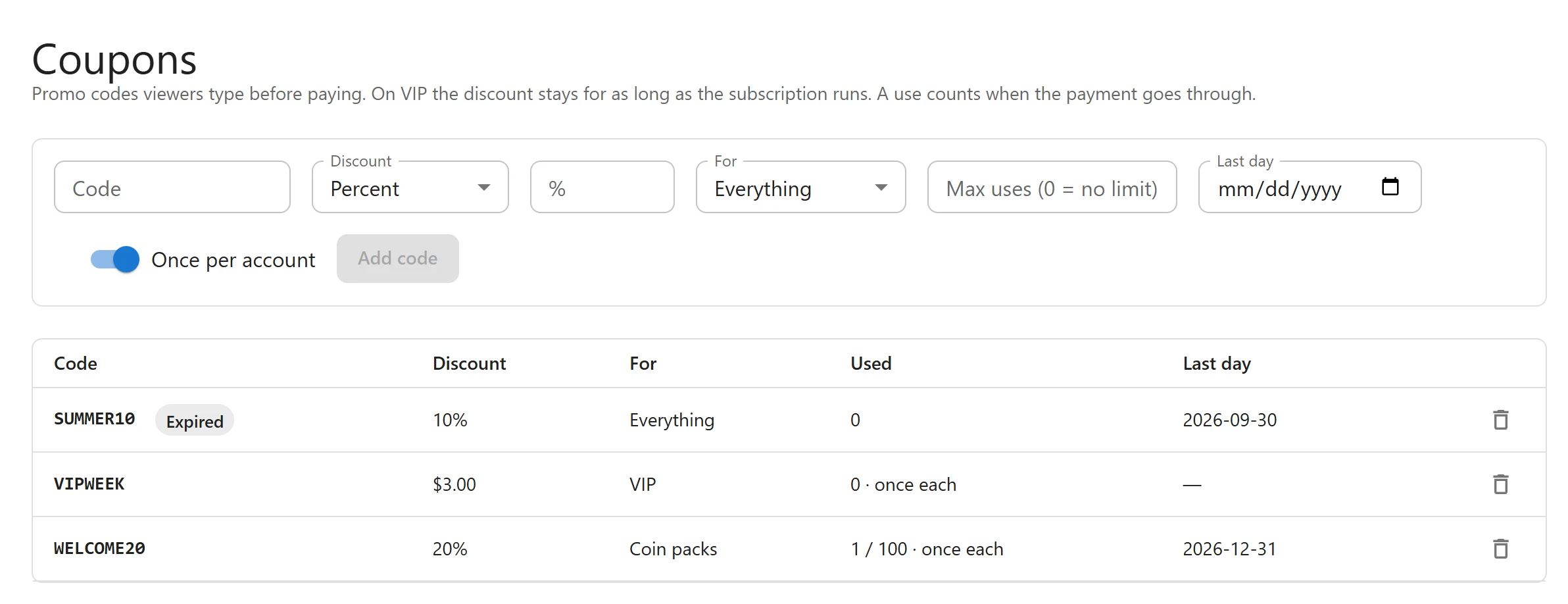
Open Coupons in the Monetization menu. “Promo codes viewers type before paying. On VIP the discount stays for as long as the subscription runs. A use counts when the payment goes through.”
The table lists every code:
| Column | What it shows |
|---|---|
| Code | The code, with Expired or Used up when it no longer works |
| Discount | The percentage, or the amount in the site’s currency |
| For | Everything, Coin packs or VIP |
| Used | Paid uses so far, the limit after a slash, and “once each” when it is once per account |
| Last day | The last day the code works, or a dash for no end |
Add a code
-
Fill in the form at the top of the page:
Field Default What it is Code 3 to 40 letters, digits, -or_. Codes are not case sensitive:welcome20andWELCOME20are the same code.Discount Percent Percent or Amount % or currency The value: 1 to 100 for a percent, or an amount such as 3.00 For Everything Everything, Coin packs or VIP Max uses (0 = no limit) 0 How many paid orders may use it, across all viewers Last day none The code works until the end of this day, in your site’s timezone Once per account On Each viewer can use it once -
Click Add code.
To change a code, add it again with the same Code: the new settings replace the old ones and its use count is kept. The delete icon at the end of a row removes the code.
How a code is applied
- A use counts only when the payment goes through. A checkout the viewer leaves uses nothing.
- A code never brings a price below 0.50 in the site’s currency (50 in JPY, KRW or VND), the smallest charge card payments allow. To give coins away, grant them on the viewer’s page, see Orders and viewers.
- On a VIP plan, the discounted price becomes that subscriber’s price at every renewal, for as long as the subscription runs.
- The code is checked again at checkout, so a code that ran out a moment before is refused there.
What the viewer sees
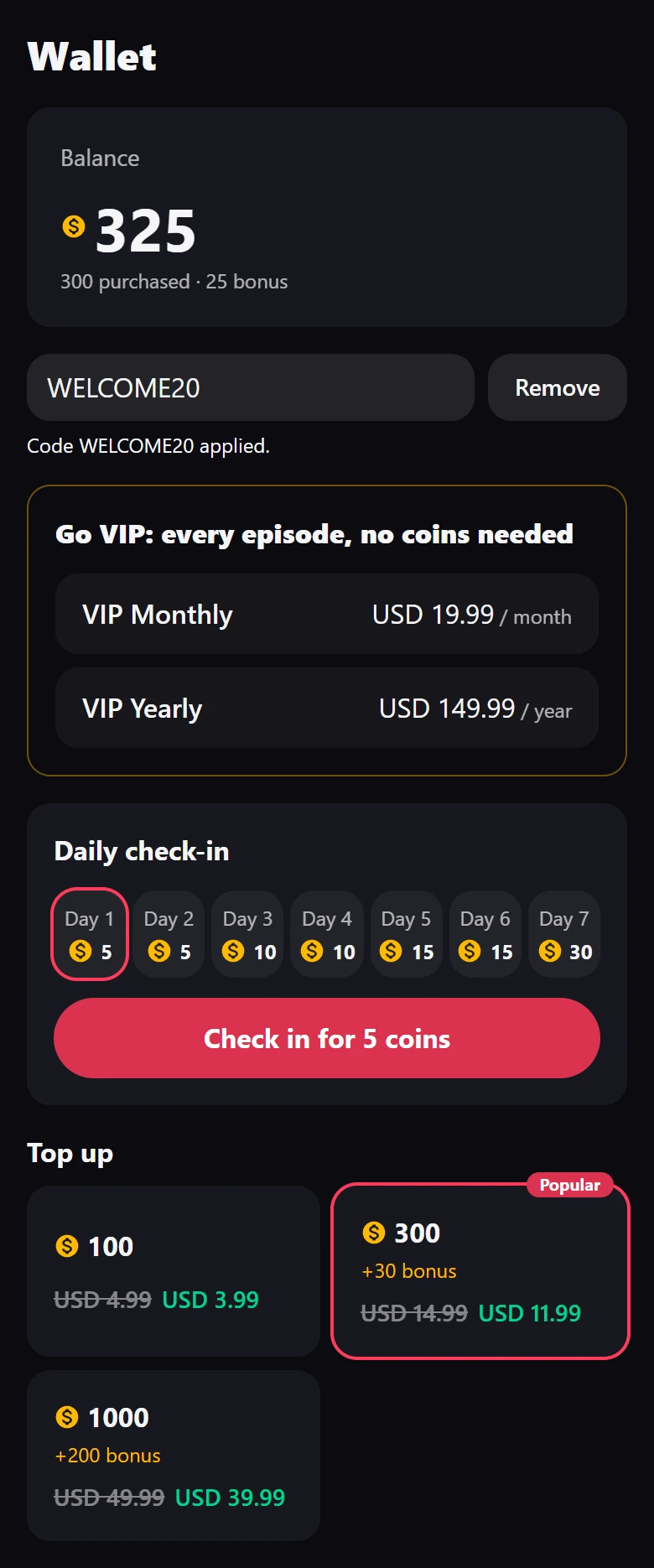
- In Wallet, the viewer types the code in Promo code and taps Apply.
- “Code WELCOME20 applied.” appears, and every price the code covers shows the old price struck through and the new one beside it.
- The viewer buys a pack or a plan as usual, at the new price. Remove takes the code off.
If the code cannot be used, the viewer reads why:
| Message | Why |
|---|---|
| “That code is not valid.” | No such code |
| “That code has expired.” | Its Last day has passed |
| “That code has been used up.” | It reached Max uses |
| “That code is for coin packs only.” / “That code is for VIP only.” | It does not cover what the viewer chose |
| “You have already used that code.” | Once per account is on and this viewer used it |
The Promo code field only appears once Stripe or PayPal is set up. Checking codes is rate-limited, so they cannot be guessed by trying many in a row.
Free trial on the first VIP plan
- Open Settings > Prices & coins.
- Under VIP plans, set Free trial (days): 1 to 31, or 0 for no trial (the default).
- Click Save.
A viewer who never had a subscription then reads in the wallet: “Start with 7 days free. Cancel any time before it ends and pay nothing.”
- The trial applies to whichever plan the viewer takes first, and VIP starts at once.
- Nothing is charged at checkout. The order shows on the Orders page with an amount of 0.
- The first payment comes when the trial ends, and is recorded as a renewal.
- Once per account, ever: an account that has had any subscription before, even a cancelled one, gets no trial.
- A viewer who cancels during the trial keeps VIP until the trial ends and pays nothing.
A promo code and the trial can be used together: the trial comes first, then the discounted price.
Related
Quick Links
Share