

Contents
On this page
Prices - Plugixa Stream
Prices live in two places. Settings > Prices & coins holds the site’s price list: currency, coins per episode, packs, plans and the check-in rewards. A series, a movie or a single episode can then set its own price in the catalog editor.
Coins are whole numbers. Money amounts (packs and plans) are in the site’s currency.
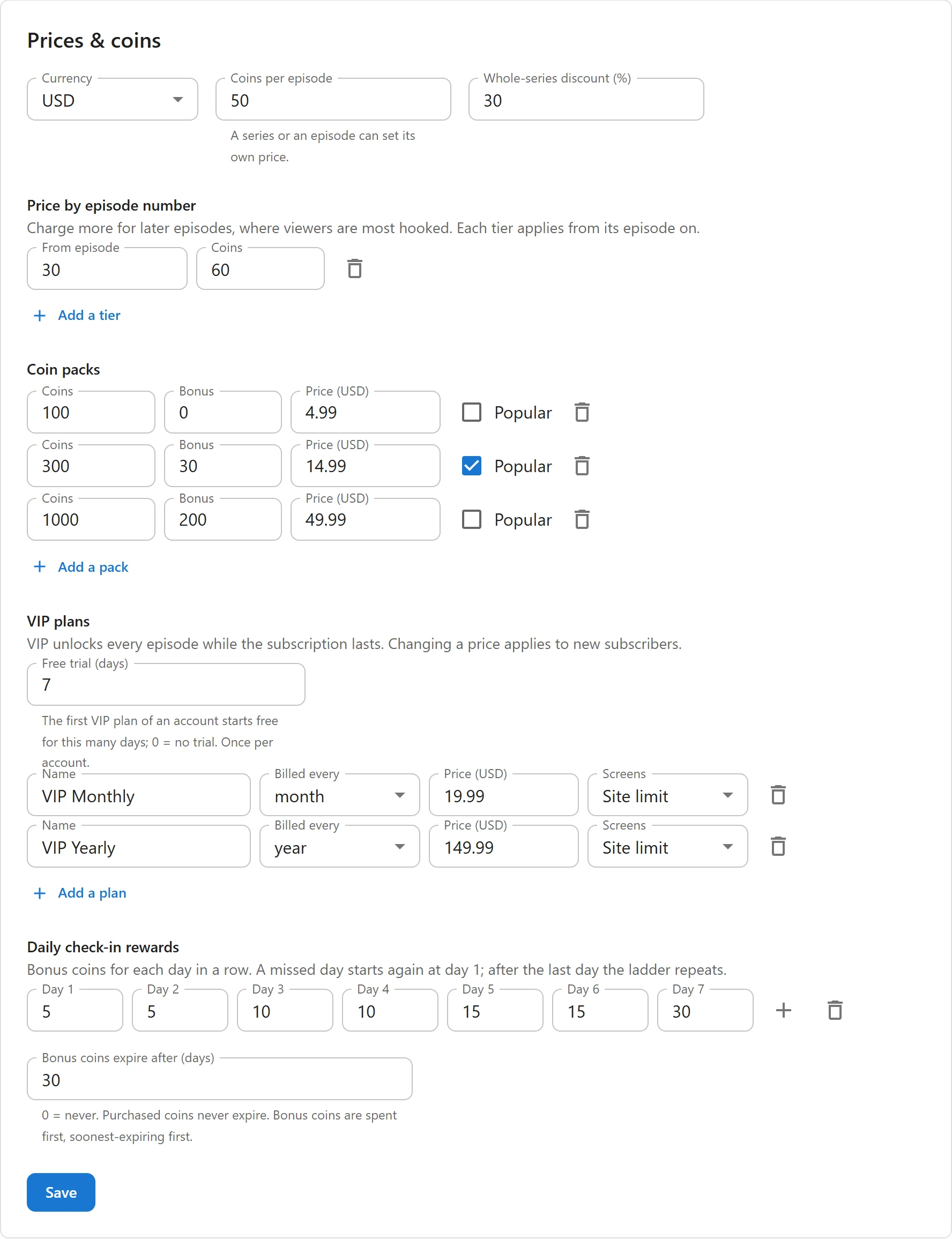
Open the price list
- Open Settings and click Prices & coins.
- Change what you need.
- Click Save at the bottom of the page.
Coins per episode
| Field | Default | What it does |
|---|---|---|
| Currency | USD | The currency of coin packs and VIP plans. One of USD, EUR, GBP, CAD, AUD, MAD, AED, SAR, EGP, TRY, INR, IDR, PHP, THB, VND, BRL, MXN, JPY or KRW. |
| Coins per episode | 50 | What a locked episode or movie costs, 0 to 100,000. “A series or an episode can set its own price.” |
| Whole-series discount (%) | 30 | The discount when a viewer unlocks every locked episode of a series at once, 0 to 90 |
Set the currency before your first sale. Prices already saved are not converted: 4.99 stays 4.99 in the new currency. JPY, KRW and VND have no cents, so a price of 500 means 500.
Price by episode number
“Charge more for later episodes, where viewers are most hooked. Each tier applies from its episode on.”
- Click Add a tier.
- Enter From episode (2 or more) and the Coins for that episode and every one after it.
- Add more tiers for later steps. The delete icon next to a tier removes it.
With Coins per episode at 50 and a tier from episode 30 at 60 coins, episodes 1 to 29 cost 50 and episode 30 onward cost 60. Tiers apply to series that do not set their own price.
Coin packs
What viewers buy in the wallet under Top up. A new site has three packs:
| Coins | Bonus | Price | Popular |
|---|---|---|---|
| 100 | 0 | 4.99 | |
| 300 | 30 | 14.99 | yes |
| 1000 | 200 | 49.99 |
| Field | What it is |
|---|---|
| Coins | Purchased coins in the pack. They never expire. |
| Bonus | Extra bonus coins on top. They follow Bonus coins expire after (days). |
| Price | In the site’s currency, for example 14.99 |
| Popular | Marks the pack with a Popular badge and an outline in the wallet |
Add a pack adds a row. A pack without coins or without a price is dropped when you save.
VIP plans
“VIP unlocks every episode while the subscription lasts. Changing a price applies to new subscribers.” A new site has VIP Monthly at 19.99 a month and VIP Yearly at 149.99 a year.
| Field | Default | What it is |
|---|---|---|
| Free trial (days) | 0 | “The first VIP plan of an account starts free for this many days; 0 = no trial. Once per account.” Up to 31. |
| Name | Shown to viewers and on the Stripe or PayPal page | |
| Billed every | month | week, month or year |
| Price | Charged at each renewal, in the site’s currency | |
| Screens | Site limit | Screens at once on this plan, 1 to 6, or the site’s limit. See Screen limits. |
Add a plan adds a row. A plan without a price is dropped when you save. See VIP subscriptions.
Check-in rewards and bonus expiry
The last part of the tab sets Daily check-in rewards (5, 5, 10, 10, 15, 15 and 30 coins on a new site) and Bonus coins expire after (days) (0, never). See Daily check-in.
A series’ own prices
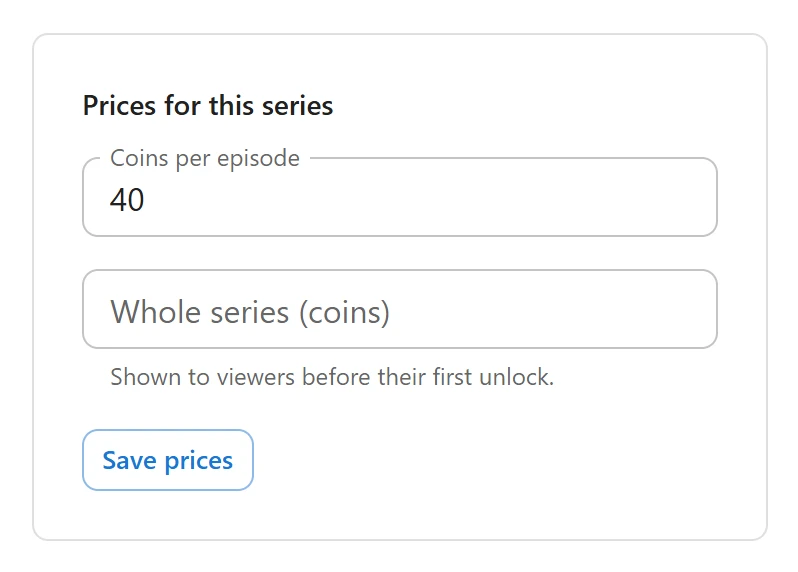
- Open Series & movies and open a saved series.
- Find the Prices for this series panel.
- Fill in the fields, then click Save prices. The panel saves on its own, apart from the series form.
| Field | Empty means | What it does |
|---|---|---|
| Coins per episode | Site default | The price of every locked episode of this series. It replaces the site price and its tiers. |
| Whole series (coins) | Automatic discount | A fixed price for all locked episodes at once. “Shown to viewers before their first unlock.” |
The fixed Whole series price applies until the viewer’s first unlock in the series. After that, the remaining episodes take the automatic discount. A bundle never costs more than the episodes would one by one.
A movie’s price
On a movie, the panel is Price for this movie with one field, Movie price (coins): “Charged only when “Free to watch” is off.” Empty uses the site’s Coins per episode.
One episode’s price
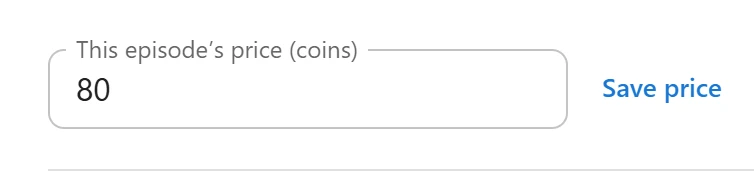
Give a single episode its own price, a finale for example:
- Open the series, then open a saved episode in its episode list.
- Enter This episode’s price (coins). Empty uses Series default.
- Click Save price.
Which price applies
For a locked episode, the first one set wins:
- The episode’s own price.
- The series’ Coins per episode (or the movie’s price).
- The tier for the episode’s number.
- Coins per episode in Settings.
A free episode costs nothing, whatever its price. A price only matters once the episode is locked, see Free and locked episodes.
Related
Quick Links
Share