

Contents
On this page
Profiles and kids mode - Plugixa Stream
People who share an account each get their own profile: their own history, resume points, My List and likes. A profile can be a kids profile, which only shows titles rated for children. Up to 5 profiles per account, the account’s own included.
Purchases, unlocks and VIP belong to the account, so every profile can watch what the account bought.
Settings
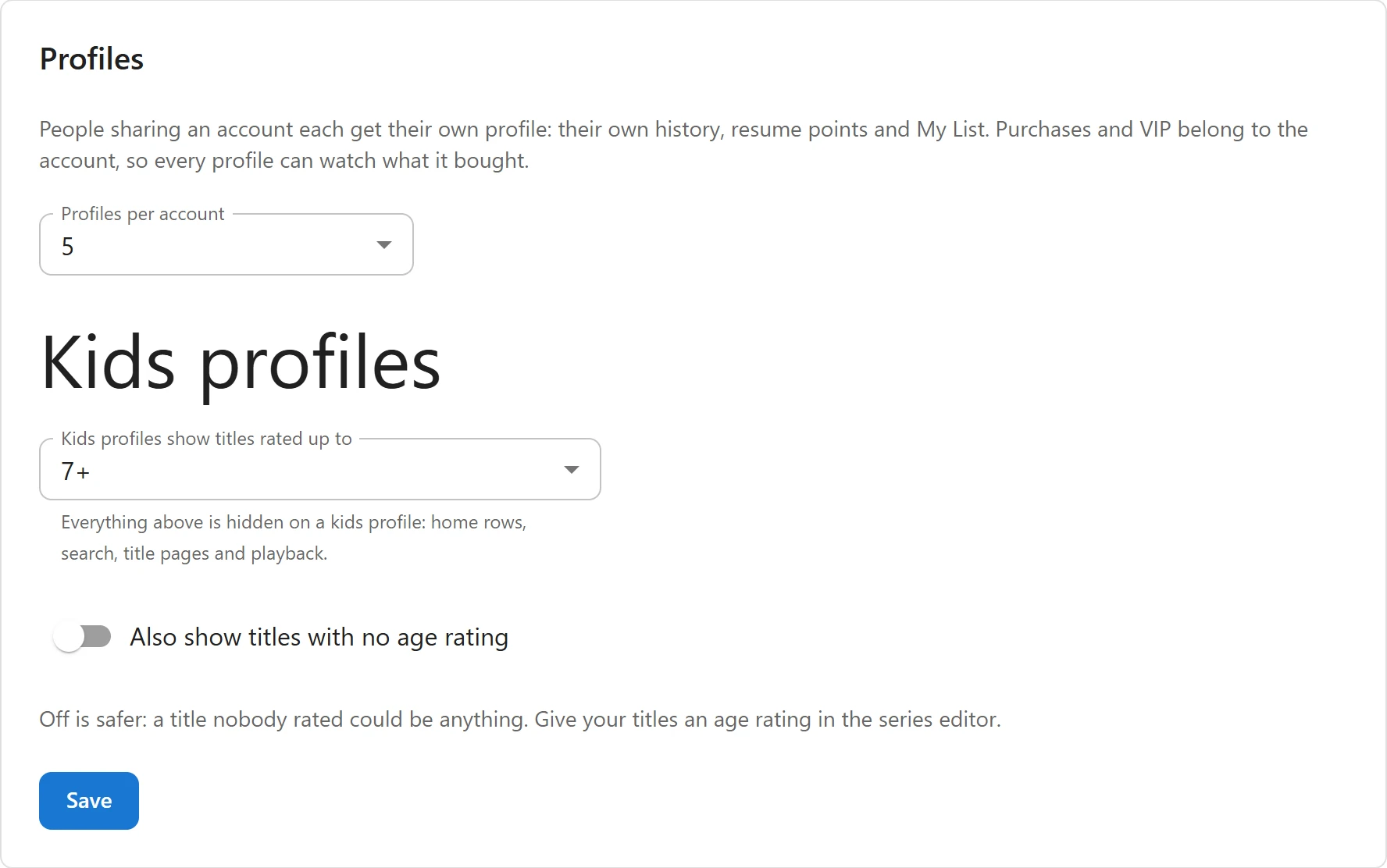
Open Settings -> Profiles.
| Setting | What it does | Default |
|---|---|---|
| Profiles per account | 1 to 5, the account’s own profile included. 1 (profiles off) turns profiles off. | 5 |
| Kids profiles show titles rated up to | All ages, 7+ or 13+. “Everything above is hidden on a kids profile: home rows, search, title pages and playback.” | 7+ |
| Also show titles with no age rating | Lets kids profiles see titles that have no Age rating. “Off is safer: a title nobody rated could be anything.” | Off |
Click Save.
Give your titles an age rating
Kids profiles go by each title’s Age rating, set in the series editor: Not rated, All ages, 7+, 13+, 16+ or 18+. With the default settings, a kids profile sees titles rated All ages and 7+, and nothing else. Rate every title you want children to find.
What viewers do
Who’s watching
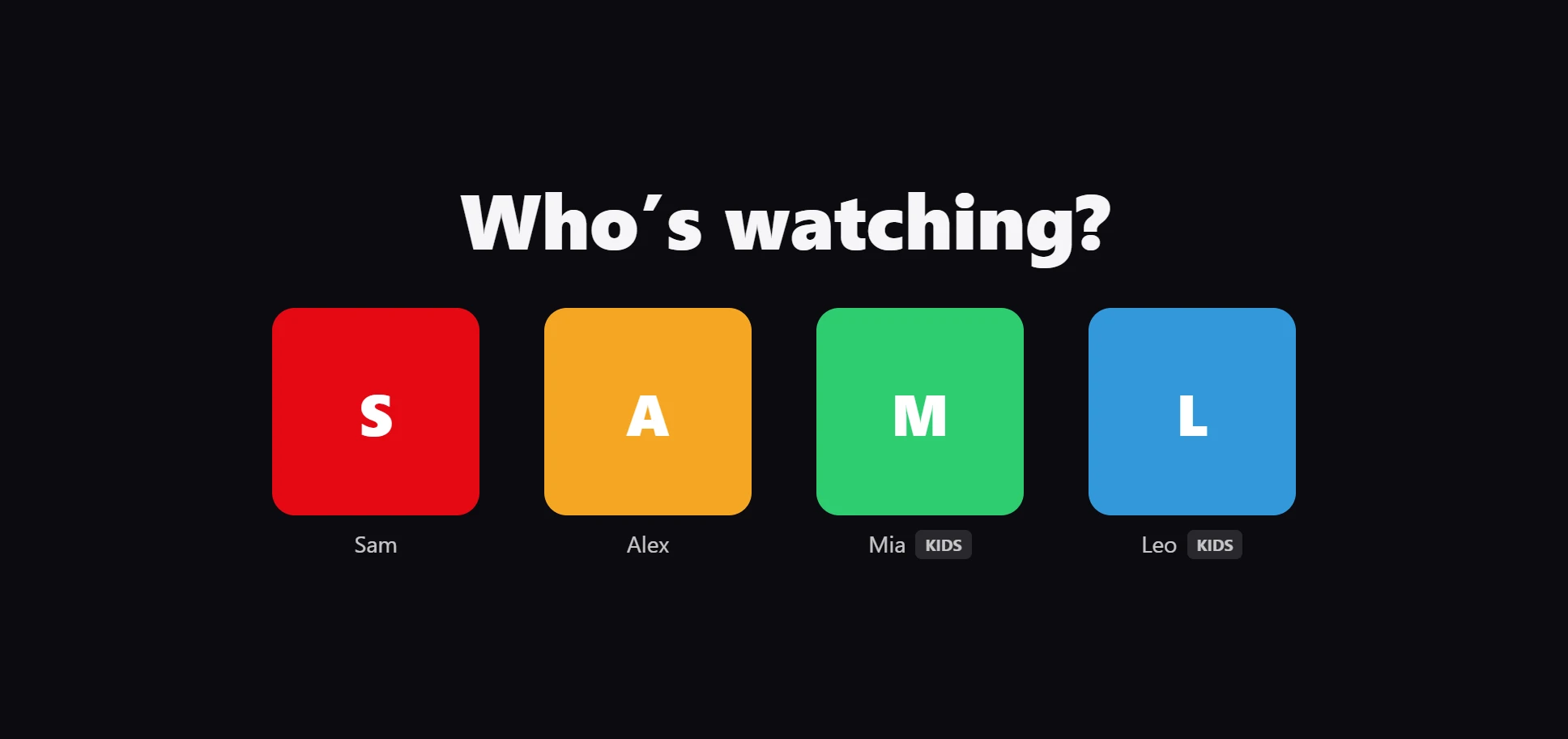
When a signed-in viewer opens the Watch page and their account has two profiles or more, the app asks “Who’s watching?” and shows each profile as a coloured circle with its first letter. Kids profiles carry a Kids tag. It asks once per browser session.
Picking a profile reloads the app on it: every row, list and resume point then comes from that profile.
Manage profiles
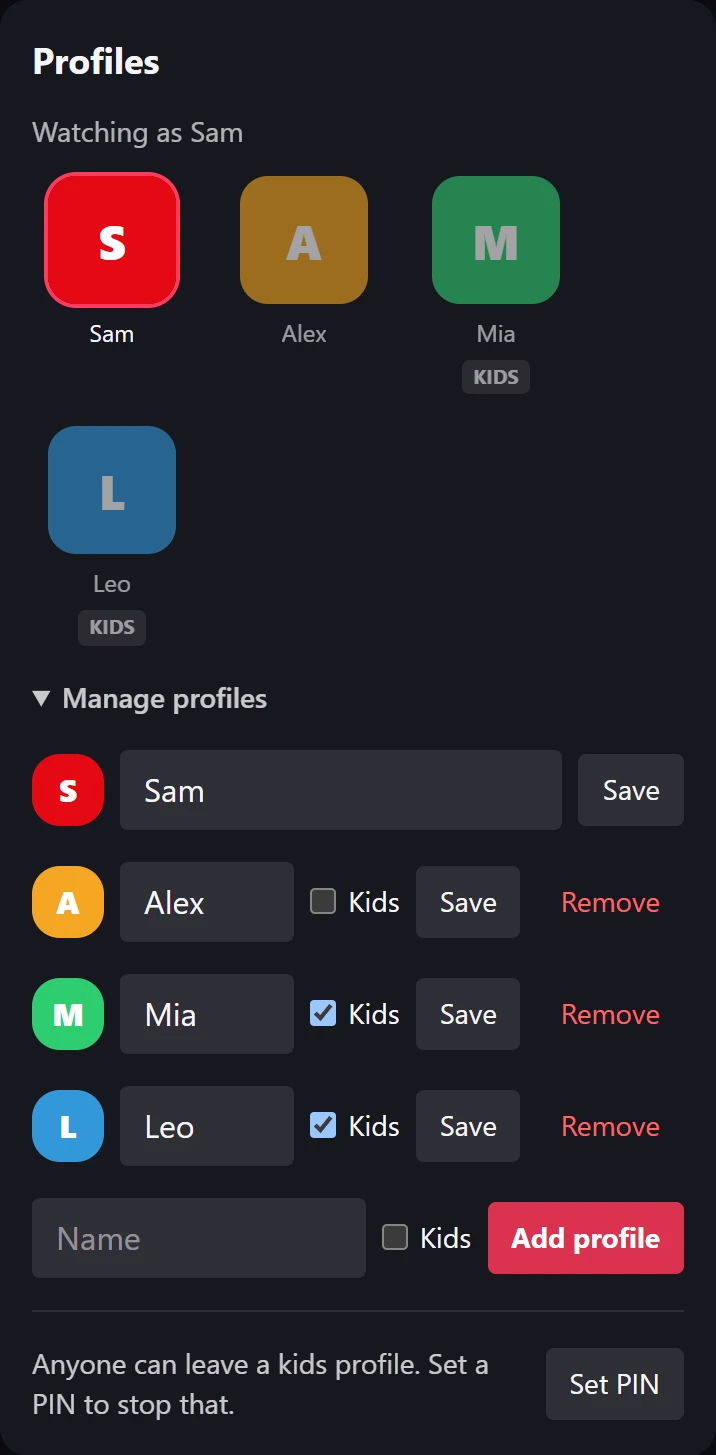
Profiles live on the Me screen, under Profiles: “Watching as” and the current name, then every profile to switch to. Manage profiles opens the tools:
- Rename a profile and click Save. Names are up to 30 characters.
- Tick or untick Kids to make a profile a kids profile or not.
- Remove asks “Remove, with its history?”, then deletes the profile with everything it watched, saved and liked.
- Type a Name, tick Kids if needed and click Add profile. When the account is full, the app says how many profiles it may have.
The account’s own profile is always first. It cannot be removed and cannot be a kids profile: it is the one that manages the others.
Kids profiles
On a kids profile:
- Home rows, the featured titles, search and browse only list titles rated up to the setting.
- A title page or an episode above the rating answers as not found, even from a direct link.
- Cast and crew pages only list titles the profile may watch.
- Viewers see star ratings but cannot write reviews or read other viewers’ reviews.
- Nothing can be bought: unlocking with coins, buying coins or VIP, checking a promo code and cancelling VIP are refused with “Ask a grown-up to switch profiles to buy or unlock.”
- Manage profiles is not shown: profiles can be changed from an adult profile only.
A kids profile can switch to another kids profile freely. Leaving for an adult profile needs the PIN, when one is set.
The PIN
Set the PIN from an adult profile, on the Me screen under Manage profiles:
| State | Shown | Buttons |
|---|---|---|
| No PIN | “Anyone can leave a kids profile. Set a PIN to stop that.” | Set PIN |
| PIN set | “A PIN is needed to leave a kids profile.” | Change PIN, Remove PIN |
The PIN is 4 digits, one per account. Changing or removing it asks for the current PIN first.
Leaving a kids profile asks “Enter the PIN to leave the kids profile”. After 5 wrong PINs, the account must wait: “Too many wrong PINs. Try again in 15 minutes.”
How profiles are kept
- The chosen profile is remembered per login session, on the server, not in a cookie. Each device keeps its own choice, and a child cannot type their way into an adult profile.
- Deleting a WordPress user deletes their profiles and what each one watched.
- The WordPress personal data export and erase tools include profiles. See Privacy and uninstall.
Related
Quick Links
Share