

Contents
On this page
Coins and unlocks - Plugixa Stream
Coins are the site’s own currency. Viewers buy coin packs with Stripe or PayPal, collect free coins with the daily check-in, and spend them to unlock locked episodes. An unlocked episode stays unlocked: there is no rental period.
Which episodes are free and which are locked is set on each series, see Free and locked episodes. What a locked episode costs is set under Settings > Prices & coins, see Prices.
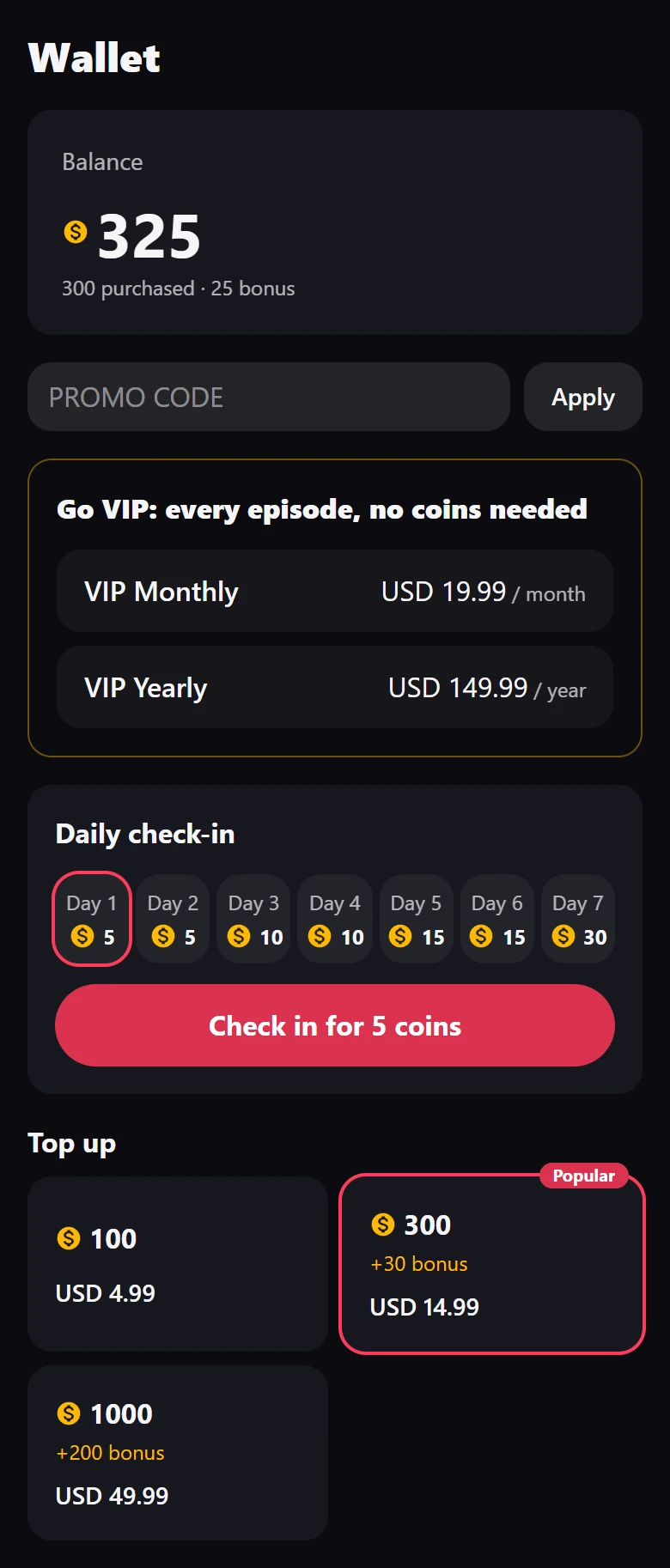
The wallet
Every signed-in viewer has a wallet. It opens from the Wallet tab of the Watch app, from top to bottom:
| Part | What it shows |
|---|---|
| Balance | The total, and the split “purchased · bonus” below it |
| Promo code | A field to apply a coupon before paying, see Coupons and free trials |
| VIP | Your VIP plans, or the viewer’s current plan, see VIP subscriptions |
| Daily check-in | The reward for each day and the claim button |
| Top up | Your coin packs, with their bonus and price |
| Auto-unlock next episode | “When you have enough coins, keep watching without a tap.” |
| Coin history | Every coin in and out, newest first |
A guest who opens the tab sees “Sign in to buy coins, check in for free coins and unlock episodes.” and a Sign in button.
The promo code field, the VIP plans and the coin packs only appear once Stripe or PayPal is set up. Before that, nothing is offered for sale. See Stripe and PayPal.
Purchased and bonus coins
The wallet keeps two kinds of coins:
- Purchased coins come from a coin pack. They never expire.
- Bonus coins come from the check-in, from a pack’s bonus, and from coins you grant by hand. They can expire, if you set Bonus coins expire after (days).
When a viewer spends coins, bonus coins go first, the ones expiring soonest first, then purchased coins. A balance never goes below zero: an unlock the viewer cannot pay for is refused with “Not enough coins.” and nothing is charged.
Buy coins
- The viewer taps a pack under Top up.
- With both Stripe and PayPal set up, a Pay with box asks for Card or PayPal. With one, the viewer goes straight to it.
- The viewer pays on the Stripe or PayPal page, then comes back to the wallet with “Thank you! Your purchase is in your wallet.”
The coins arrive when the payment is confirmed: by the webhook for Stripe, by the return to the site or the webhook for PayPal. A pack of 300 coins with a bonus of 30 adds 300 purchased coins and 30 bonus coins.
Unlock an episode
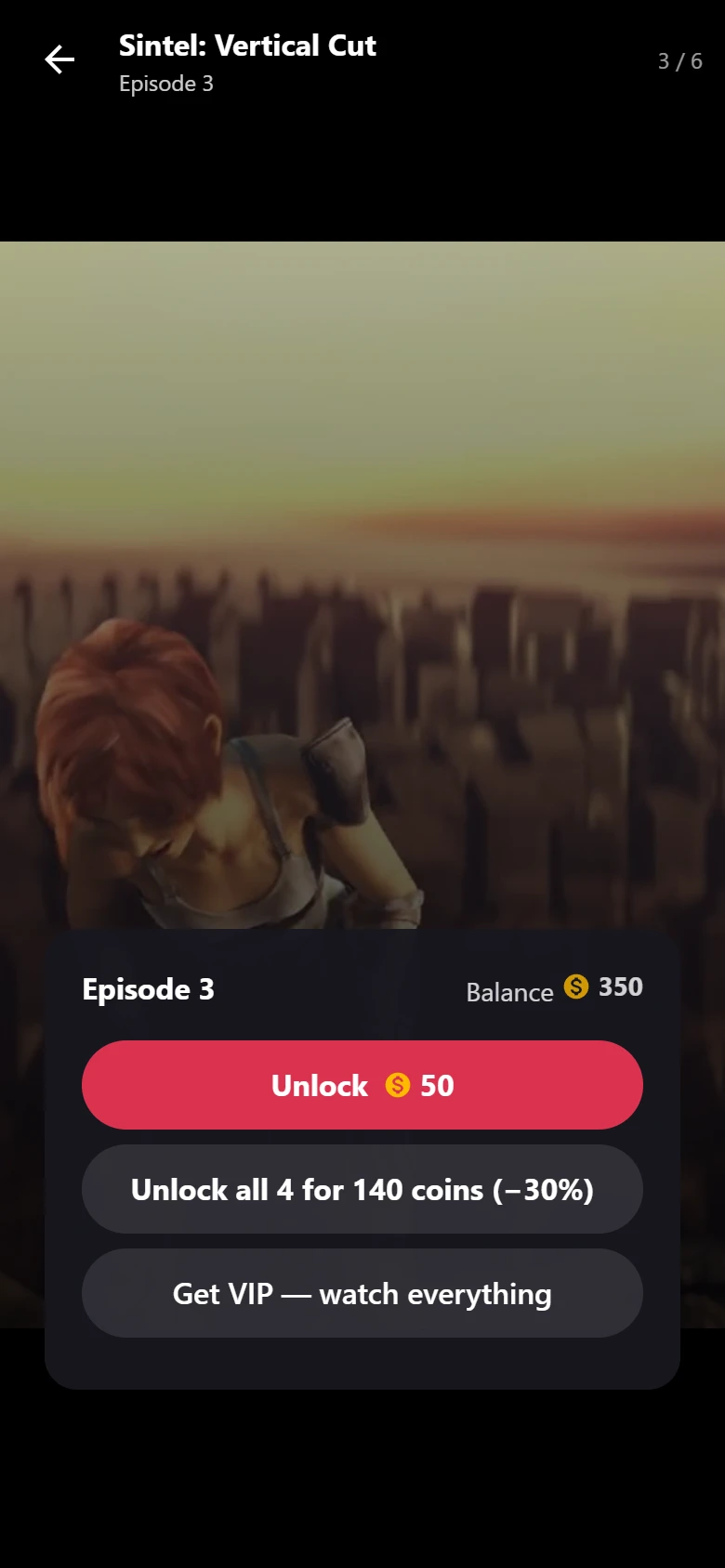
When a viewer reaches a locked episode, the player shows the unlock sheet:
- A guest sees the price, “Unlock for 50 coins” for example, and Sign in to keep watching.
- A signed-in viewer sees the episode number (or the movie’s title) and their Balance.
- With enough coins, an Unlock button with the price. One tap spends the coins and the episode plays.
- Without enough, a button to top up that names the price and opens the wallet.
- When more than one episode of the series is still locked and the viewer can afford it, a second button: “Unlock all 4 for 140 coins”, with the discount.
- When you sell VIP plans, a link to get VIP, which opens the wallet.
With Auto-unlock next episode on, a viewer who has enough coins skips the sheet: the next locked episode unlocks on its own and keeps playing. The choice is saved in the viewer’s browser, so it applies per device.
An episode can only be bought once. A second tap, or the same unlock from two tabs, charges nothing and answers “You already unlocked this episode. Nothing was charged.”
Unlock a whole series
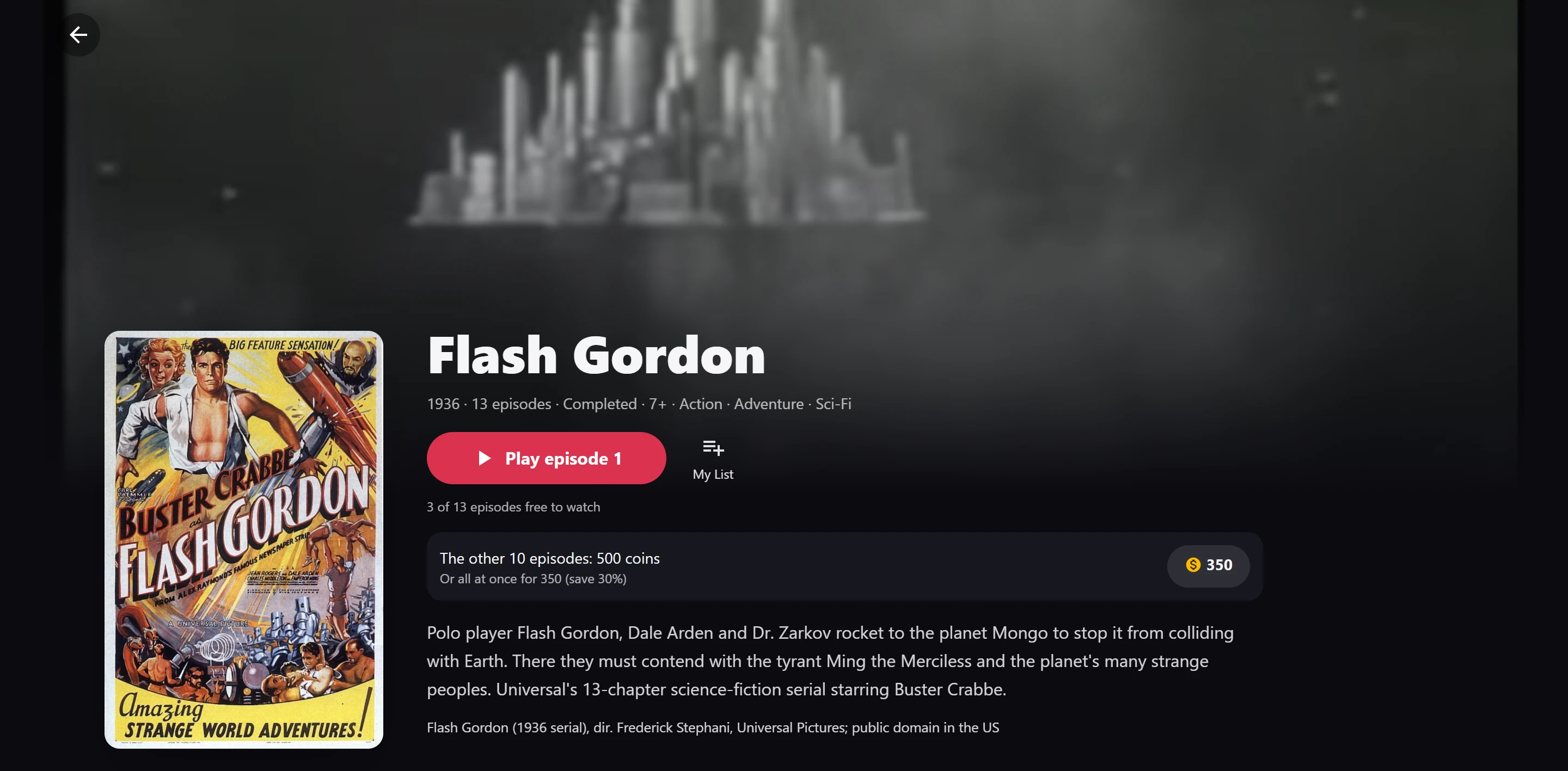
The series screen shows the full price before the first coin is spent: “The other 10 episodes: 500 coins”, and below it “Or all at once for 350 (save 30%)”. A signed-in viewer unlocks them all with the button that shows the bundle price.
The bundle covers every published episode that is still locked for this viewer, at the moment of purchase. Episodes the viewer already owns are not charged again, and episodes you publish later are not part of it. The bundle price is the Whole-series discount (%), or the Whole series (coins) price you set on the series, see Prices.
Unlock a movie
A movie is a title with a single video. When Free to watch is off on the movie, it is locked and sold like one episode. The movie’s page reads “This movie: 50 coins”, and the unlock sheet shows the movie’s title. Set its price with Movie price (coins) on the movie, see Prices.
VIP members
A viewer with an active VIP plan plays every episode and every movie without spending coins. The series screen reads “VIP: every episode is yours”. See VIP subscriptions.
Coin history
Coin history in the wallet lists every movement with its date and amount: purchases, check-ins, unlocks (“Flash Gordon”, the episode number), whole-series unlocks, coins you granted or removed with your reason, refunds and expired bonus coins. Rows are never edited or deleted, so the history always adds up to the balance.
You see the same history, and can give or take coins, on the viewer’s page in the admin. See Orders and viewers.
Refunds and unlocks
When a coin pack is refunded or its payment is disputed, its coins leave the wallet. A partial refund made at Stripe or PayPal takes back the same share of the coins. If the viewer already spent them, the episodes bought with those coins since the payment are locked again, newest first, until the coins are covered. Episodes opened by VIP or bought before that payment are not touched. See Orders and viewers.
Show your prices on a page
The [plugixa_stream_pricing] shortcode shows your VIP plans and coin packs as cards on any page.
Each card opens the wallet in the Watch app, where the purchase happens. See
Shortcodes.
Related
Quick Links
Share