

Contents
On this page
SEO pages - Plugixa Stream
The Watch app is built for viewers: it draws its screens in the browser, so a search engine sees little in it. For search engines, every series, movie and episode also has its own page, written out in plain HTML by your site with the title, poster, synopsis and episode list. Those pages are what gets indexed, and every Watch button on them leads into the app at the right episode.
They need no setup: a series has its page as soon as it is published.
The URLs
| Page | Address |
|---|---|
| A series or a movie | /series/<slug>/ |
| An episode | /episode/<slug>/ |
| Browse all titles | /series/ |
| One genre | /series-genres/<slug>/ |
| One tag | /series-tags/<slug>/ |
| One studio | /series-studios/<slug>/ |
| One language | /series-languages/<slug>/ |
The slug is the one set on the series, episode or term. These addresses start right after
your site address: a prefix in your post permalinks (such as /blog/) is not added to them.
The plugin refreshes WordPress’s permalinks on its own the first time these rules are needed.
A movie has one URL. A movie’s video is stored as its single episode, but that episode’s
page (/episode/big-buck-bunny-ep-1/) redirects permanently (301) to the movie’s page
(/series/big-buck-bunny/), so the film never competes with itself in search results.
Series and episodes also appear in your site’s search results, like any public content.
What is on the pages
The look depends on your theme:
- Block theme: the pages use the Stream page templates, which you can edit in the Site Editor. See Page templates.
- Classic theme: the theme keeps its own header, footer and layout, and the plugin fills the content area.
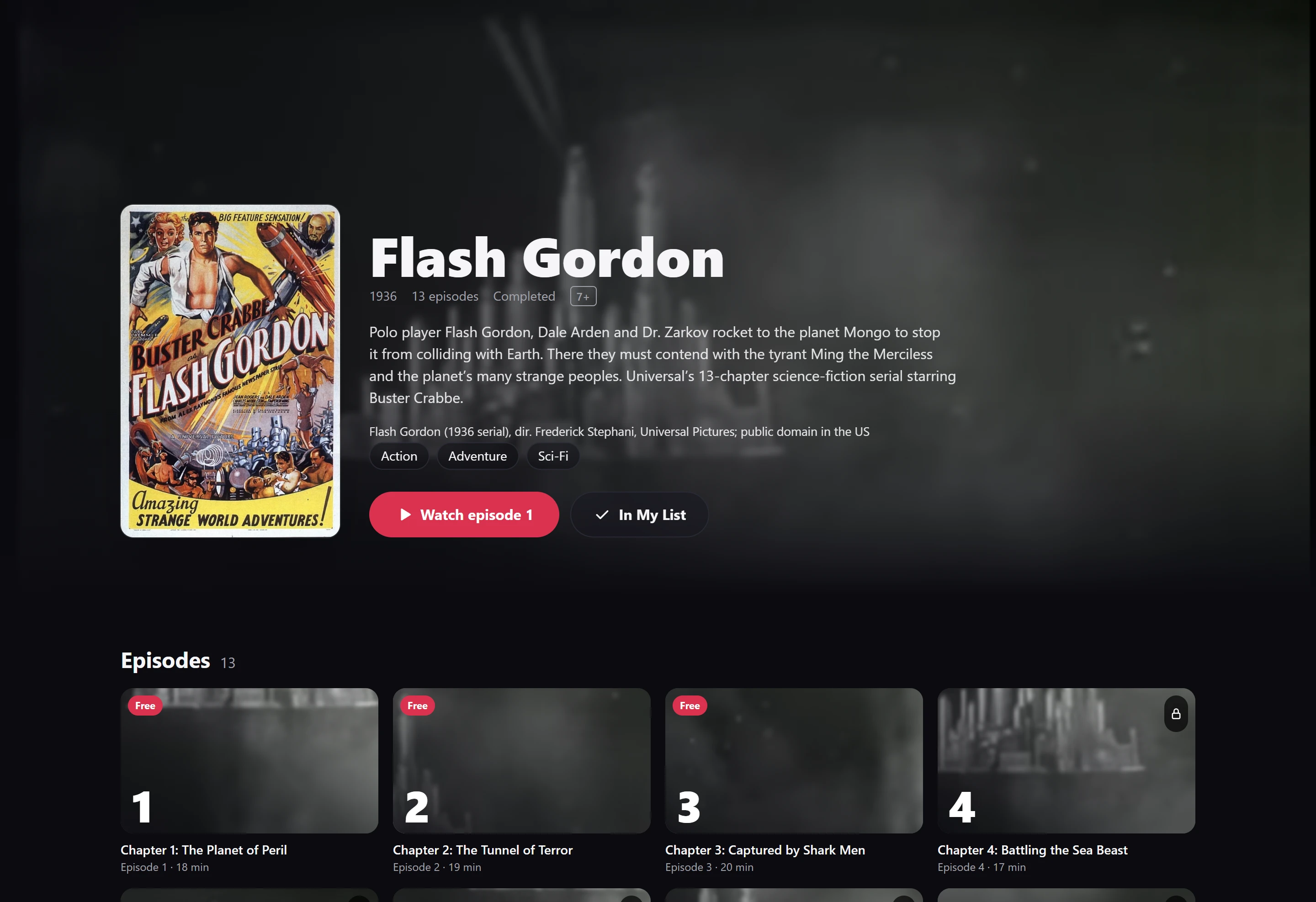
On a classic theme, a series page shows the poster, a line of facts (year, number of episodes, genres, age rating, Ongoing or Completed; for a movie: Movie, the year, the running time, genres and rating), the synopsis, a Watch episode 1 or Watch the movie button, and an Episodes list in which free episodes are marked Free. An episode page shows a link to its series, the episode’s description and a Watch this episode button.
None of these pages plays video. Each episode in the list links to that episode in the Watch app.
Structured data
Each published series, movie and episode page carries schema.org data (JSON-LD) in its
<head>, so search engines can show the title, poster and episode count in a result.
| Page | Type | Fields |
|---|---|---|
| A series | TVSeries |
name, url, description, image (the poster), genre, numberOfEpisodes, startDate (the year), potentialAction |
| A movie | Movie |
name, url, description, image, genre, duration, datePublished (the year), potentialAction |
| An episode | TVEpisode |
name, url, episodeNumber, partOfSeries (the series’ name and url), timeRequired |
The description is the first 50 words of the synopsis. potentialAction is a WatchAction
whose target is the title’s address in the Watch app. Empty fields are left out. Draft and
private titles get no structured data.
What the Flash Gordon page prints, shortened:
{
  "@context": "https://schema.org",
  "@type": "TVSeries",
  "name": "Flash Gordon",
  "url": "https://example.com/series/flash-gordon/",
  "image": "https://example.com/wp-content/uploads/2026/10/flash-gordon-1936-poster.jpg",
  "genre": ["Action", "Adventure", "Sci-Fi"],
  "numberOfEpisodes": 13,
  "startDate": "1936",
  "potentialAction": {
    "@type": "WatchAction",
    "target": "https://example.com/watch/#/series/2814"
  }
}
Titles and descriptions
The page title is WordPress’s own: the series or episode title followed by your site name, in the format your theme sets. The plugin does not add a meta description or social sharing tags. If you use an SEO plugin, set those there.
Sitemap
Series, episodes, genres, tags, studios and languages are public content, so WordPress’s
built-in sitemap at /wp-sitemap.xml lists them automatically, alongside your posts and
pages. If an SEO plugin replaces that sitemap with its own, include the Series and
Episodes content types and the Stream taxonomies there.
The Watch page
The Watch app’s own screens (/watch/#/series/12) are one page with different endings after
the #, which search engines treat as a single address. Link to the series pages
(/series/<slug>/) when you want a title to be found; their Watch buttons take the
visitor into the app.
Quick Links
Share