

Contents
On this page
Shortcodes - Plugixa Stream
Shortcodes put the Watch app or a piece of your catalog on any page, post or widget of your site. Each catalog shortcode has a block that prints exactly the same thing, so use whichever suits your editor.
| Shows | Shortcode | Block |
|---|---|---|
| The whole Watch app | [plugixa_stream_app] |
none |
| A row of posters | [plugixa_stream_row] |
Video catalog row |
| One series as a card or banner | [plugixa_stream_series id="12"] |
Video series |
| The viewer’s series in progress | [plugixa_stream_continue] |
Continue watching |
See Blocks for the blocks.
The row, series and continue-watching shortcodes are written out by your site in plain HTML, with no script. Their posters and buttons link into the Watch app; they never play video on the page itself. They use the colours, roundness and font from Appearance, and their styles are kept apart from your theme’s, so the two do not clash.
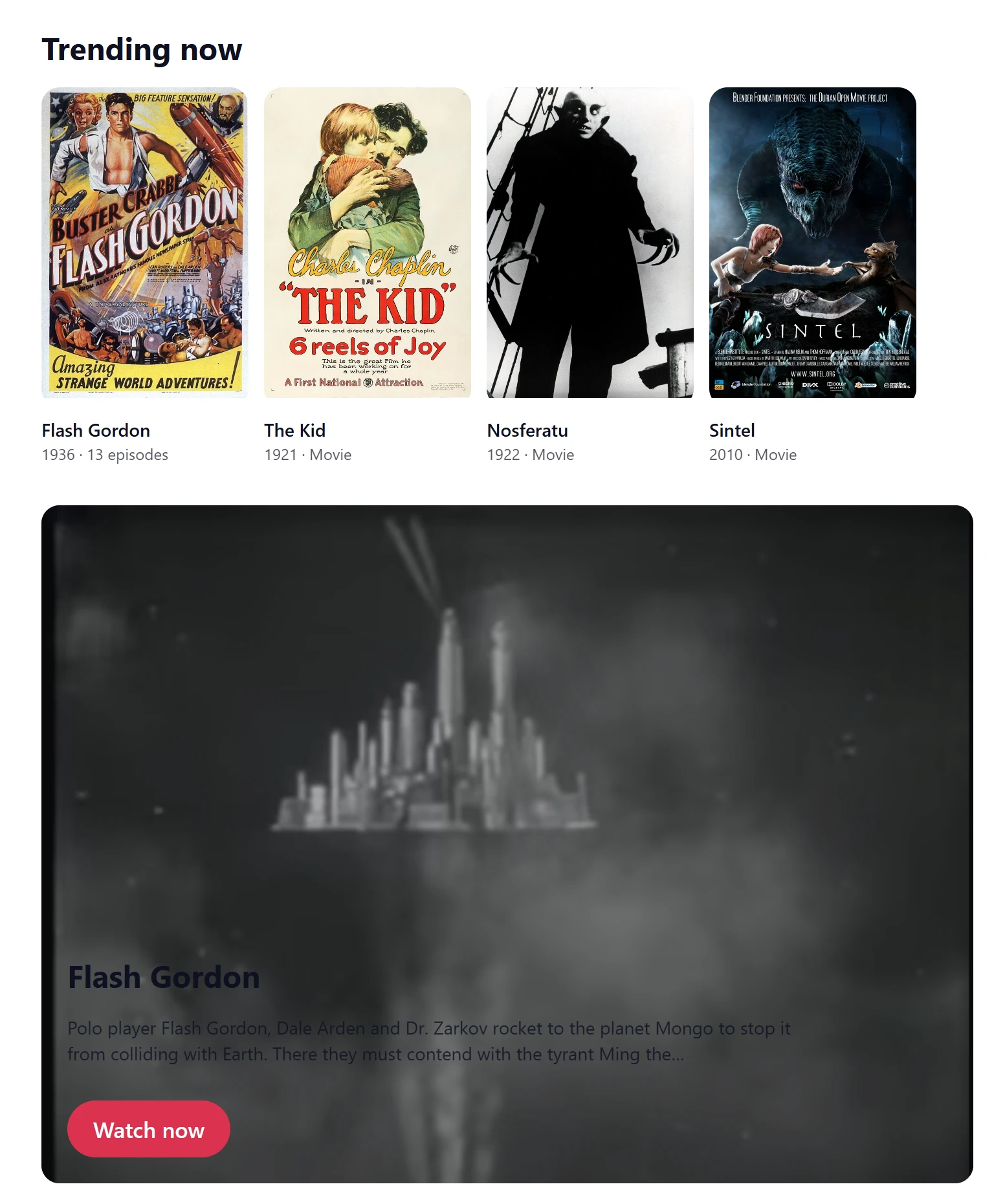
The Watch app: [plugixa_stream_app]
The whole viewer app: Home, series screens, Discover, My List, Me and the player. It takes no attributes. The plugin puts it on the Watch page when you activate it.
A page with this shortcode is shown full-screen, without your theme. Use it on one page only. See The Watch app.
A row of posters: [plugixa_stream_row]
A row of series posters that scrolls sideways, with an optional heading.
| Attribute | Value | Default |
|---|---|---|
type |
trending (most viewers in the last 7 days), new (newest first), featured (the series you marked featured) or genre (one genre, set with genre) |
trending |
genre |
A genre slug, for type="genre", such as drama |
none |
title |
The heading above the row | No heading |
limit |
How many posters, 1 to 30 | 12 |
row |
The id of a row from Home rows. Uses that row’s heading, rule and size, and overrides type, genre, limit and related |
none |
related |
1 shows “More like this”: titles in the same genre as the series of the current page, without that series |
Off |
[plugixa_stream_row type="trending" title="Trending now"]
[plugixa_stream_row type="genre" genre="drama" title="Drama" limit="20"]
[plugixa_stream_row row="new"]
[plugixa_stream_row related="1"]
Rows from Home rows. Each row on the Home rows screen shows the shortcode for it, such
as [plugixa_stream_row row="trending"]. That is the way to embed a hand-picked row, and the
embedded row changes whenever you edit it there. A title you add still replaces its heading.
See Home rows.
More like this. With related="1", the row uses the first genre of the series the page is
about (a series page, a movie page, or an episode page’s series) and leaves that series out. Its
heading is “More like this” unless you set title. On a page that is not about a series, or for
a series with no genre, it shows nothing. To turn it off, leave the attribute out.
One series: [plugixa_stream_series]
One series or movie, as a poster card or as a wide banner.
| Attribute | Value | Default |
|---|---|---|
id |
The series’ id. Required. | none |
layout |
card (the poster, title, year and episode count) or banner (the series banner with its title, the start of the synopsis and a Watch now button) |
card |
[plugixa_stream_series id="2814"]
[plugixa_stream_series id="2814" layout="banner"]
The id is the number at the end of the series’ address in the admin: editing Flash Gordon
opens #/series/2814. The banner uses the series’ banner image, or its poster when it has
none, and the first 30 words of the synopsis. Only a published series is shown.
Continue watching: [plugixa_stream_continue]
The signed-in viewer’s series in progress, each poster with a progress bar and “Episode N”, linking straight to that episode in the player.
| Attribute | Value | Default |
|---|---|---|
title |
The heading above the row | “Continue watching” |
limit |
How many series, 1 to 20 | 6 |
[plugixa_stream_continue]
[plugixa_stream_continue title="Pick up where you left off" limit="10"]
It shows nothing to guests, whose progress lives in their browser, and nothing to a viewer who has not started anything. See Resume and My List.
When a shortcode shows nothing
Visitors never see an error: an empty row or a missing series simply leaves no trace. People who can edit content see a dashed box with the reason instead:
| Message | Why |
|---|---|
| “No series to show here yet.” | The row has no published series to show |
| “Choose a published series to show.” | id is missing, wrong, or the series is not published |
Continue watching shows nothing for guests and for viewers with nothing in progress, editors included.
Quick Links
Share