

Contents
On this page
VIP subscriptions - Plugixa Stream
VIP is a subscription billed every week, month or year. While it is active, the viewer plays every locked episode and movie without spending coins, and sees no video ads. Stripe and PayPal take the recurring payments: the plugin never stores card details.
A new site comes with two plans, VIP Monthly at 19.99 and VIP Yearly at 149.99 in the site’s currency. Change them under Settings > Prices & coins, see Prices.
What VIP opens
- Every locked episode and movie, on every series, for as long as the plan is active. The unlock sheet is not shown and nothing is charged.
- No ads. A VIP member never gets a pre-roll or a mid-roll.
- Screens. Each plan can allow its own number of screens at once. See Screen limits.
The series screen reads “VIP: every episode is yours”, and a movie’s page “VIP: included in your membership”.
Coins stay in the wallet while a viewer is VIP. Episodes bought with coins stay unlocked after VIP ends, while episodes opened only by VIP lock again.
Take a plan
- The viewer opens Wallet in the Watch app. Under “Go VIP: every episode, no coins needed” are your plans, each with its price and “/ month”, “/ week” or “/ year”.
- The viewer can apply a promo code first, see Coupons and free trials.
- They tap a plan, choose Card or PayPal when both are set up, and subscribe on the Stripe or PayPal page.
- Back on the site, VIP starts as soon as the payment is confirmed.
The locked episode sheet also links to the wallet when you sell VIP plans.
A viewer holds one plan at a time: a VIP member who tries to take another gets “You are already a VIP.” The plans only show once Stripe or PayPal is set up.
Free trial
With Free trial (days) above 0, the first plan an account ever takes starts with that many free days. The wallet tells the viewer: “Start with 7 days free. Cancel any time before it ends and pay nothing.” The first charge comes when the trial ends. An account that has had any subscription before gets no trial. See Coupons and free trials.
Renewals
The payment service renews the plan on its own schedule and tells the site through its webhook. Each paid renewal is recorded as a Paid VIP order on the Orders page, and counts in your revenue. With Stripe, the renewal also moves the end of the current period forward, so VIP continues.
When a renewal payment fails, the viewer stays VIP until the end of the period they paid for, while Stripe or PayPal tries again. If the subscription ends without payment, VIP ends with it.
Three days before a plan renews or ends, the viewer can get a reminder email. See Email notifications.
Cancel a plan
The viewer cancels
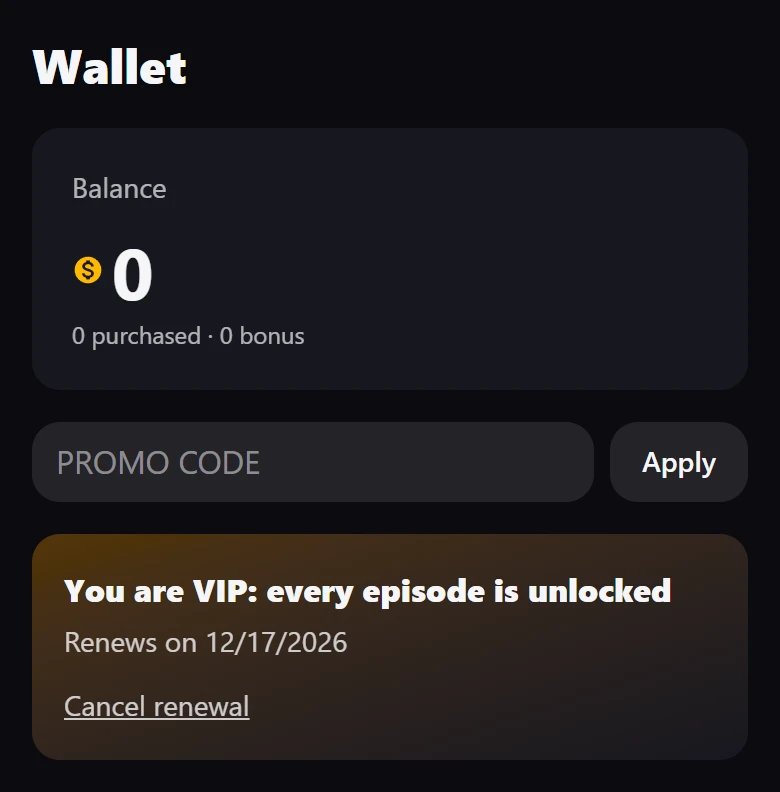
In the wallet, a VIP member sees “Renews on” and the date, and a Cancel renewal link. It asks “Stop renewing? You keep VIP until the end of the period you paid for.” and Stop renewing confirms. The card then reads “Ends on” and the date. Nothing more is charged, and VIP ends on that date.
You stop a renewal
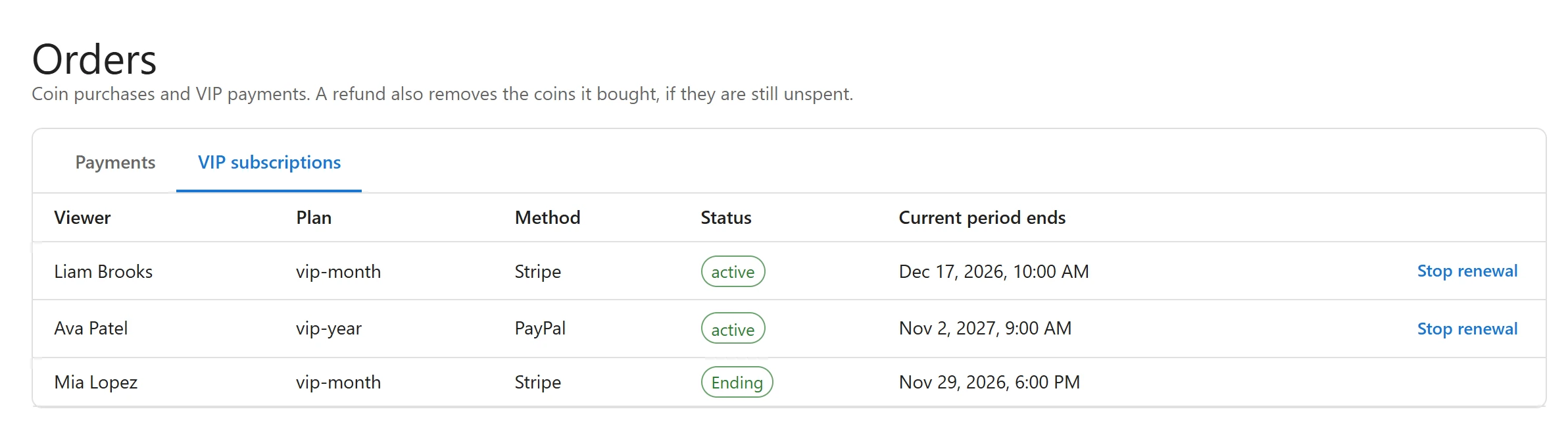
- Open Orders in the Monetization menu and click the VIP subscriptions tab.
- Click Stop renewal on the viewer’s row.
The status changes to Ending. Like the viewer’s own cancellation, the plan is not renewed and the viewer keeps VIP until Current period ends. There is no button to end VIP at once: to do that, cancel the subscription immediately in your Stripe Dashboard or PayPal account.
Refund a VIP payment
The Refund button on the Orders page is for coin packs only. Refund a VIP payment in your Stripe Dashboard or your PayPal account. A refund there does not end the subscription by itself: cancel it there too if the viewer should lose VIP.
Change a plan’s price
“Changing a price applies to new subscribers.” A viewer who subscribed before keeps paying the price they signed up at, for as long as their subscription runs. Removing a plan from the list does not cancel the subscriptions already running on it.
Who is VIP
- Viewers, in the Monetization menu, shows “Until” and the date for each VIP member.
- Orders > VIP subscriptions lists every subscription with its status.
- The dashboard’s Revenue card counts Active VIPs.
See Orders and viewers.
Related
Quick Links
Share