

Contents
On this page
Ratings and reviews - Plugixa Stream
Signed-in viewers rate a title from 1 to 5 stars and may add a few words. Each title page shows its average, the star breakdown and the written reviews. You decide whether written reviews go live at once or wait for you, and viewers can report a review that should not be there.
Settings
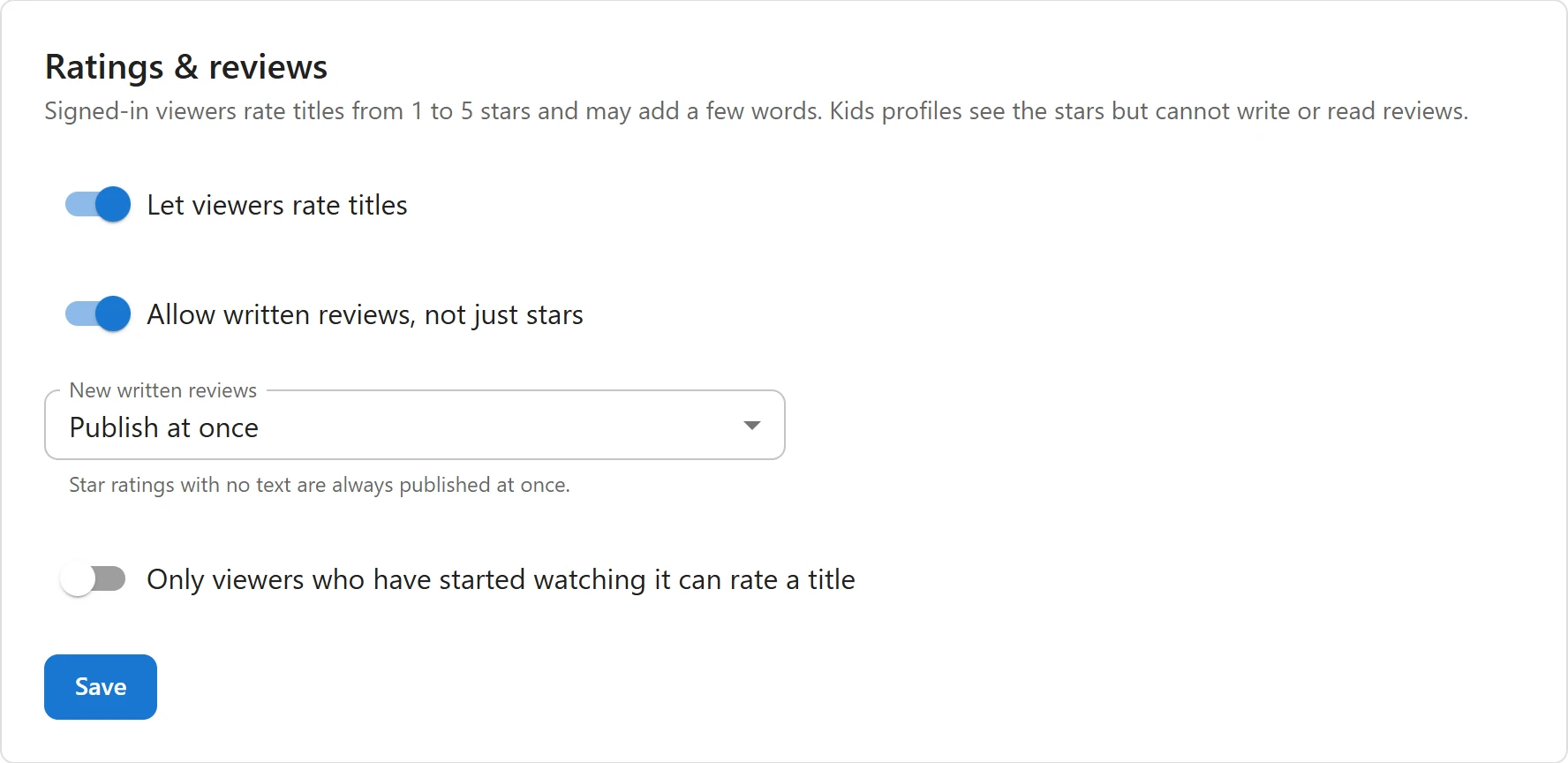
Open Settings -> Ratings & reviews.
| Setting | What it does | Default |
|---|---|---|
| Let viewers rate titles | Turns ratings and reviews on. Off, the title pages show none of it. | On |
| Allow written reviews, not just stars | Off, viewers can only give stars. | On |
| New written reviews | Publish at once, or Wait for my approval. “Star ratings with no text are always published at once.” | Publish at once |
| Only viewers who have started watching it can rate a title | A viewer must have played part of the title first. Others read “Watch it first, then tell others what you think.” | Off |
Click Save.
What viewers see
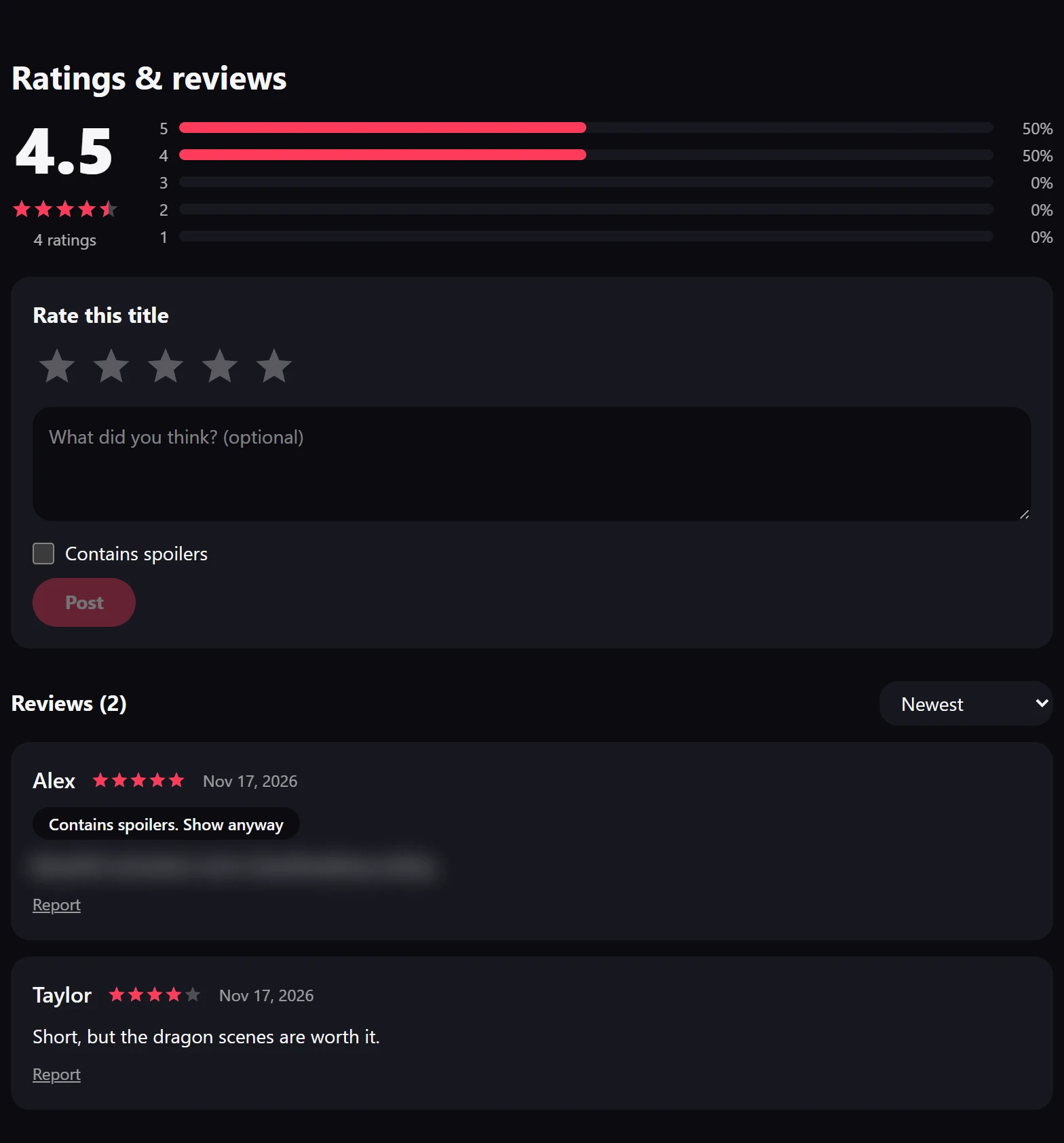
On a title page in the Watch app:
- Under the buttons: the stars, the average (such as 4.3) and the number of ratings (such as “12 ratings”). Clicking it jumps to the reviews. A title with no rating yet shows nothing here.
- At the foot, Ratings & reviews: the average, a bar per star, the viewer’s own form, and the written reviews.
Rate and review
- Sign in and open the title. A guest reads “Sign in to rate this title.” with a link.
- Under Rate this title, pick from 1 to 5 stars.
- Optionally write a review in “What did you think? (optional)”, up to 2,000 characters.
- Tick Contains spoilers if it gives the story away.
- Click Post.
Each viewer has one review per title: writing again replaces it (Update), and Delete removes it. With profiles, each profile rates on its own.
When the review waits for approval, the viewer reads “Thanks! Your review shows once it has been approved.” A review you hid shows “Your review is not shown to others.” to its writer.
Read reviews
- Sort reviews: Newest, Highest rated or Lowest rated.
- 10 reviews at a time, with More reviews for the next ones.
- A review marked as a spoiler is covered: “Contains spoilers. Show anyway” reveals it.
- Reviews show the writer’s first name or display name, or the profile’s name. A login name, or a name that looks like an email address, is never shown.
- Only reviews with text are listed. Star-only ratings count in the average and the bars.
Kids profiles see the stars but cannot write reviews or read other viewers’ text.
Report a review
Under someone else’s review, Report asks “Report this review?”, then says “Reported. Thanks for letting us know.” Each account can report a review once. A review reported by 3 different accounts is taken down and waits on the Reviews page until you look at it.
Moderate reviews
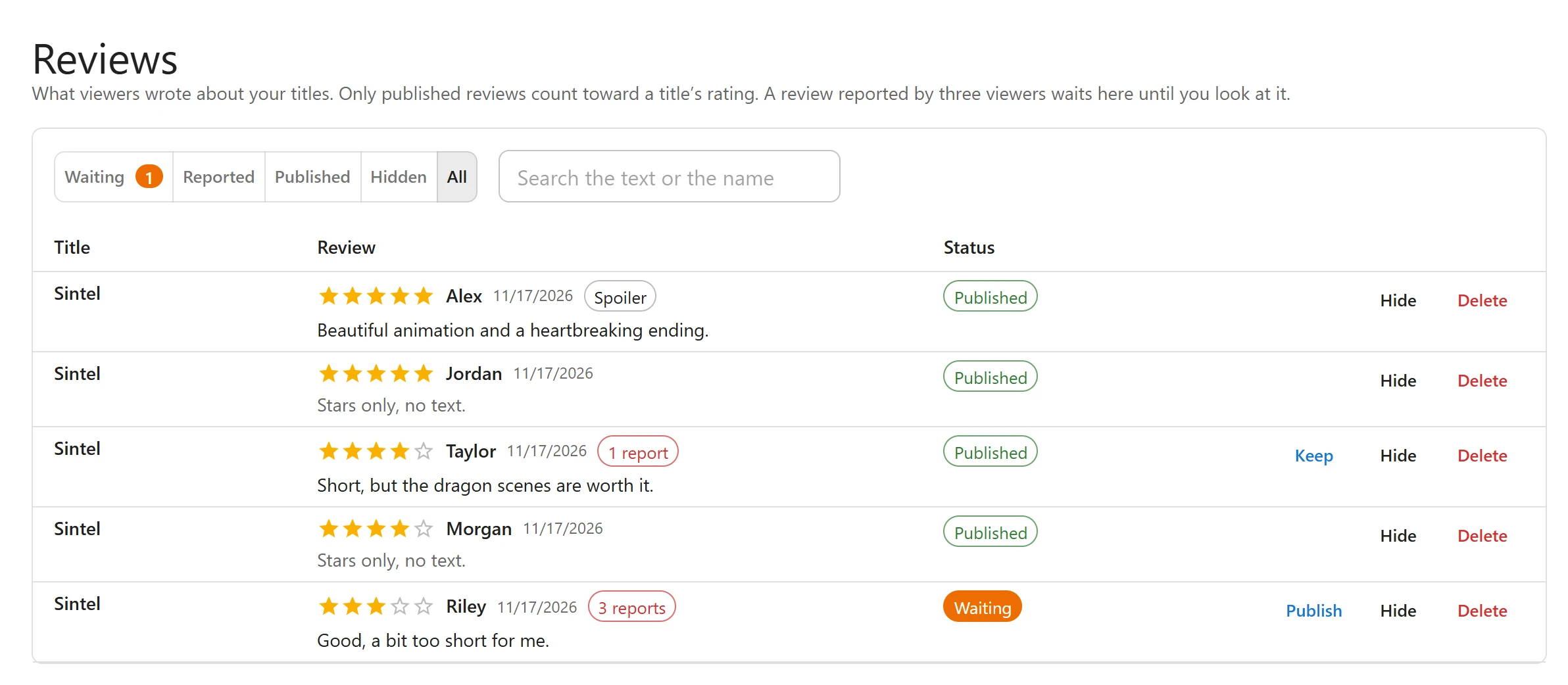
Open Reviews in the admin sidebar (#/reviews): “What viewers wrote about your titles. Only
published reviews count toward a title’s rating.”
Filter the list with Waiting, Reported, Published, Hidden or All, and search with Search the text or the name. Each row shows the title, the stars, the writer, chips for Spoiler and the number of reports, the text (“Stars only, no text.” when there is none) and the status.
| Status | Meaning |
|---|---|
| Waiting | Held for approval, or taken down after 3 reports. Not shown to viewers. |
| Published | Shown, and counted in the title’s rating. |
| Hidden | Hidden by you. Not shown and not counted. |
| Button | What it does |
|---|---|
| Publish | Publishes a waiting or hidden review, and clears its reports. |
| Keep | On a published review with reports: keeps it published and clears the reports. |
| Hide | Hides the review. |
| Delete | Asks “Delete for good?”, then removes the review. |
A review stays where you put it:
- A review taken down by reports stays waiting until you publish it, even if its writer edits it. Otherwise the writer could save it straight back.
- A hidden review stays hidden when its writer edits it.
- With Wait for my approval, an edited review whose words changed waits again. Changing only the stars keeps it published.
The Top rated home row
Add a row of type Top rated (viewers’ stars) to the home screen to list your best-rated titles. See Home rows.
The order is not the plain average: every title starts as if it had 5 extra votes of 3 stars. A title with one 5-star vote does not beat a title with two hundred votes averaging 4.8. Only published reviews count, and only titles with a rating are listed.
Data
- Deleting a title deletes its reviews.
- Deleting a WordPress user deletes their reviews, and the WordPress personal data tools export and erase them. See Privacy and uninstall.
Related
Quick Links
Share