Contents

AI FAQ Generator — Plugixa FAQ

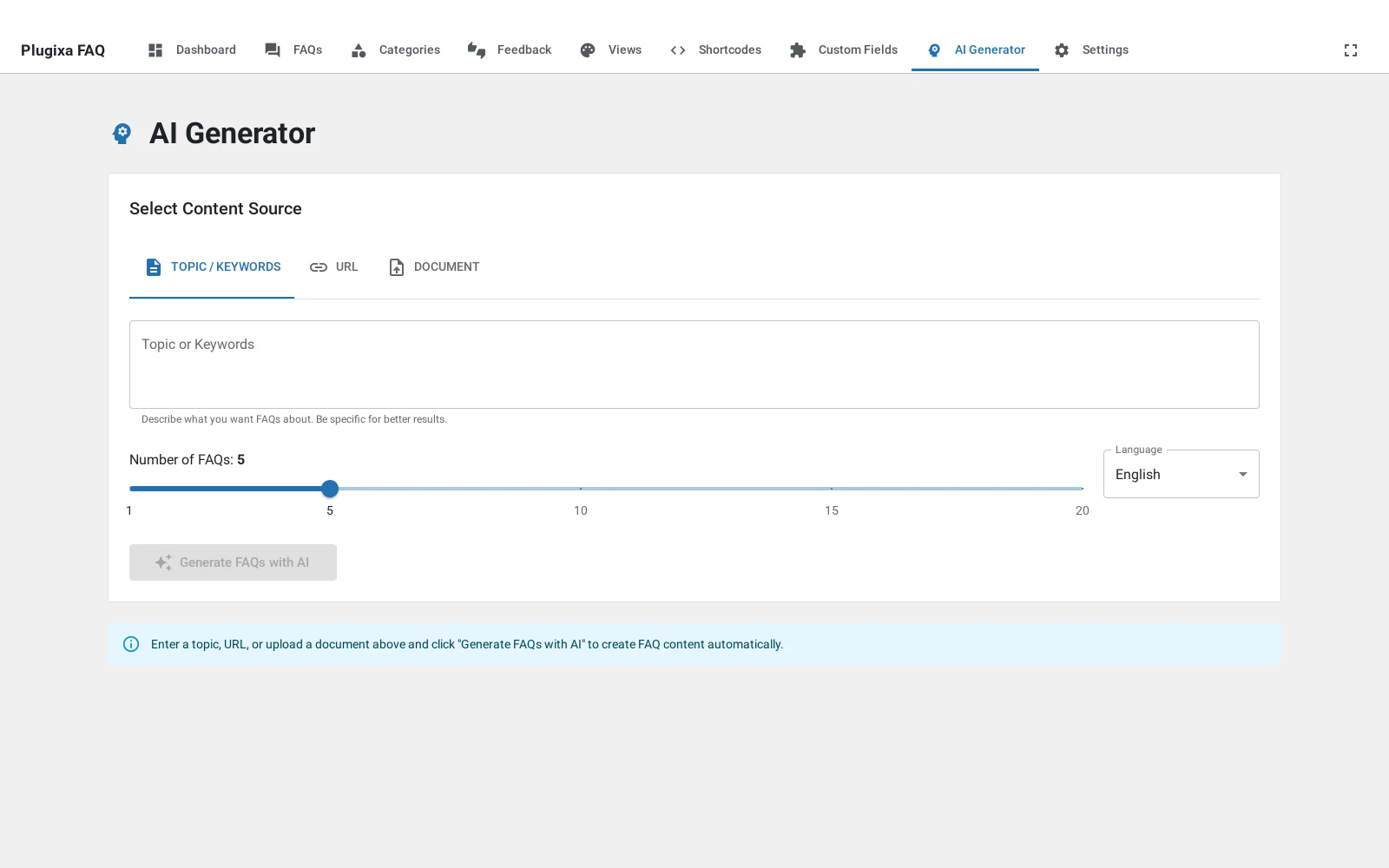
Generate FAQs automatically from a topic, a URL, or a PDF/document. Uses OpenAI or Google Gemini behind the scenes.

AI Generator main screen

Setup

1 · Get an API key

Pick a provider:

2 · Configure the plugin

Go to Plugixa FAQ → Settings → AI Generator.

AI settings

Field Notes
Enable AI Generator Master toggle.
Provider openai or google.
API key Encrypted at rest. Never displayed after save.
Model See Models.
Temperature 0.0 (deterministic) to 1.0 (creative). 0.7 is a good default.
Max tokens Response length cap. 2000 is typical.
Default language Target language for generated content (e.g., “English”, “French”).

3 · Test the connection

Click Test connection. The plugin makes a minimal request and reports success, API error, or rate-limit.

Models

OpenAI

Model Cost Speed Quality Recommended use
gpt-4o-mini $ Fast Good Default — bulk generation
gpt-4o $$ Fast Excellent Flagship content
gpt-4-turbo $$ Medium Excellent Legacy — prefer 4o
gpt-4 $$$ Slow Excellent Rarely needed
gpt-3.5-turbo $ Fast OK Low-budget draft
o1 / o3 $$$$ Slow Reasoning Deep analysis — overkill for FAQs

Models are fetched dynamically from OpenAI, so new releases appear automatically.

Google Gemini

Model Cost Speed Quality Notes
gemini-1.5-flash $ Fast Good Default
gemini-1.5-pro $$ Medium Excellent Long-context
gemini-pro $ Fast Good Legacy

Four ways to generate

Generator modes

From a topic

Generate from topic

Enter a topic (e.g., “shipping policy”) and a count, then click Generate. The AI produces N question/answer pairs. Optional: provide context or a tone guide.

Topic: "Shipping to Europe"
Count: 8
Tone: Friendly, professional
Target audience: E-commerce customers

From a URL

Generate from URL

Paste a URL. The plugin:

  1. Fetches the page (via class-url-scraper.php).
  2. Strips HTML and boilerplate, extracting the main content.
  3. Sends the content to the AI with instructions to generate FAQs.

Best for turning an existing blog post, documentation page, or product description into FAQs.

From a PDF or document

Generate from PDF

Upload a PDF, DOCX, or TXT. The plugin:

  1. Parses text from the document (via class-document-parser.php + PDF Parser library).
  2. Extracts key content.
  3. Generates FAQs.

Common use: turning a product manual into a structured FAQ section.

File size limit: 20 MB (configurable via plugixa_faq_ai_max_file_size filter).

Category generation

Generate a full category of FAQs from a single prompt:

  1. Click Generate category.
  2. Name the category (e.g., “Returns”).
  3. Specify the count and optional context.
  4. Review and import.

Review and import

After generation, the FAQs appear in a preview table:

Review generated FAQs

For each row:

  • Regenerate title — rewrite just the question.
  • Regenerate content — rewrite just the answer.
  • Edit inline — click to edit either field.
  • Reject — remove from the batch.

Click Import to save the remaining rows as draft FAQs.

Import generated FAQs

Multilingual generation

If Multilingual is active, the Target language field appears. The plugin generates in the specified language and sets language_code on the imported FAQs.

For translation of existing FAQs: open an FAQ → Translate with AI → pick target language. The plugin asks the AI to translate (not paraphrase), then creates a new translation linked to the source via translation_group.

REST API

All endpoints require Pro license + manage_options:

Method Endpoint Description
POST /wp-json/plugixa-faq/v1/ai-generator/generate-faq Single Q&A from a prompt.
POST /wp-json/plugixa-faq/v1/ai-generator/generate-faqs Batch. Body: { topic, count, language?, tone?, context? }.
POST /wp-json/plugixa-faq/v1/ai-generator/generate-from-url Body: { url, count, language? }.
POST /wp-json/plugixa-faq/v1/ai-generator/generate-from-file Multipart with the uploaded file.
POST /wp-json/plugixa-faq/v1/ai-generator/generate-category Category-level generation.
POST /wp-json/plugixa-faq/v1/ai-generator/regenerate-title Rewrite a single question.
POST /wp-json/plugixa-faq/v1/ai-generator/regenerate-content Rewrite a single answer.

Hooks

Hook Type Description
plugixa_faq_before_ai_generate action Before a generation request. Args: topic, provider, count.
plugixa_faq_after_ai_generate action After a successful generation. Args: faqs, topic, provider.
plugixa_faq_ai_generated_faq filter Modify a single generated item.
plugixa_faq_ai_generated_faqs filter Modify the whole batch.
plugixa_faq_ai_provider_config filter Override provider settings at runtime (e.g., per-category temperature).

Cost estimation

Rough costs per batch of 10 FAQs with gpt-4o-mini at default settings:

  • ~5,000 input tokens (topic + instructions)
  • ~2,500 output tokens (10 Q&A pairs)
  • Cost: ~$0.003 USD

The URL / PDF flows add input tokens proportional to document length.

Troubleshooting

“API error 401”

API key is wrong or revoked. Regenerate in the provider dashboard and re-save.

“API error 429”

Rate-limited. Wait, or switch to a higher-tier plan with the provider.

Generated FAQs are generic

  • Raise the specificity of your topic (“Shipping to EU countries” → “Shipping to France: customs and taxes”).
  • Provide a Context paragraph with brand voice, specific product details, etc.
  • Lower temperature to 0.5 for less variation, or raise to 0.9 for more.

URL scraping returned nothing

Some sites block scrapers. Try saving the page as PDF and uploading that instead.

Quick Links